cancel
Showing results for 
Search instead for 
Did you mean: 

The Power BI Data Visualization World Championships is back! It's time to submit your entry. Live now!

Reply
Shaji
Helper I
Helper I

DAX Query

Hi,

For instance I have a table like this:

CustomerCust IDTypeSales
A11Platinum100
A11Gold20
A11 300
B12Silver200
C13Gold100
C13Silver400
D14Platinum600


Now I need to show in a card or some box the type of Customers:


Eg: If i select a customer name using the select box then ideally my result should be:


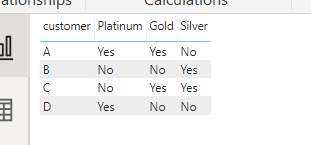
CustomerPlatinumGoldSilver
AYesYesNo


I belive we should use DAX query to get the result. Please advice


1 ACCEPTED SOLUTION
ryan_mayu
Super User
Super User

@Shaji 


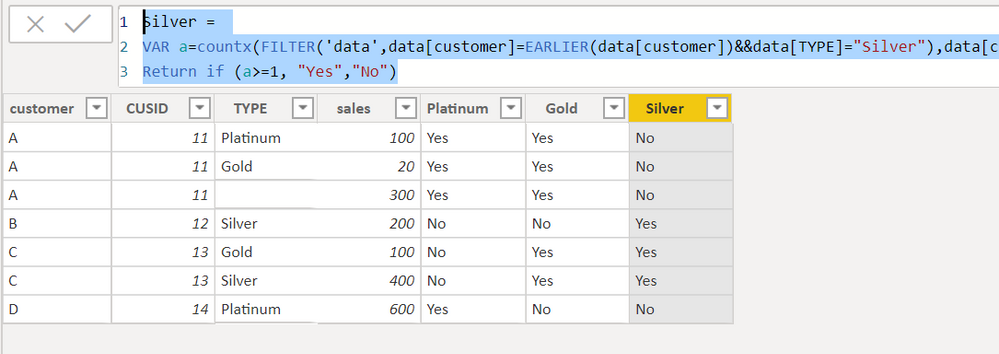
You can create three columns.


Platinum = 
VAR a=countx(FILTER('data',data[customer]=EARLIER(data[customer])&&data[TYPE]="Platinum"),data[customer])
Return if (a>=1, "Yes","No")
Gold = 
VAR a=countx(FILTER('data',data[customer]=EARLIER(data[customer])&&data[TYPE]="Gold"),data[customer])
Return if (a>=1, "Yes","No")
Silver = 
VAR a=countx(FILTER('data',data[customer]=EARLIER(data[customer])&&data[TYPE]="Silver"),data[customer])
Return if (a>=1, "Yes","No")

1.PNG2.PNG


Did I answer your question? Mark my post as a solution!

Proud to be a Super User!


View solution in original post

3 REPLIES 3
ryan_mayu
Super User
Super User

@Shaji 


You can create three columns.


Platinum = 
VAR a=countx(FILTER('data',data[customer]=EARLIER(data[customer])&&data[TYPE]="Platinum"),data[customer])
Return if (a>=1, "Yes","No")
Gold = 
VAR a=countx(FILTER('data',data[customer]=EARLIER(data[customer])&&data[TYPE]="Gold"),data[customer])
Return if (a>=1, "Yes","No")
Silver = 
VAR a=countx(FILTER('data',data[customer]=EARLIER(data[customer])&&data[TYPE]="Silver"),data[customer])
Return if (a>=1, "Yes","No")

1.PNG2.PNG


Did I answer your question? Mark my post as a solution!

Proud to be a Super User!


amitchandak
Super User
Super User

@Shaji ,

Try like

Type measure = coalesce(max(Table[Type]),"No")

Share with Power BI Enthusiasts: Full Power BI Video (20 Hours) YouTube
Microsoft Fabric Series 60+ Videos YouTube
Microsoft Fabric Hindi End to End YouTube

@amitchandak 


The result comes as:

Customer Platinum Gold Silver
A              Platinum Gold  No


instead of 


Customer Platinum Gold Silver
A              Yes           Yes   No

Helpful resources

Announcements
FabCon Atlanta 2026 carousel

FabCon Atlanta 2026

Join us at FabCon Atlanta, March 16-20, for the ultimate Fabric, Power BI, AI and SQL community-led event. Save $200 with code FABCOMM.