cancel
Showing results for 
Search instead for 
Did you mean: 

Learn from the best! Meet the four finalists headed to the FINALS of the Power BI Dataviz World Championships! Register now

Reply
Shaji
Helper I
Helper I

DAX Query

Hi,

For instance I have a table like this:

CustomerCust IDTypeSales
A11Platinum100
A11Gold20
A11 300
B12Silver200
C13Gold100
C13Silver400
D14Platinum600


Now I need to show in a card or some box the type of Customers:


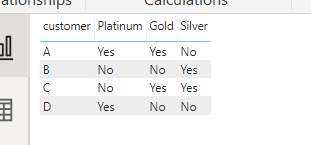
Eg: If i select a customer name using the select box then ideally my result should be:


CustomerPlatinumGoldSilver
AYesYesNo


I belive we should use DAX query to get the result. Please advice


1 ACCEPTED SOLUTION
ryan_mayu
Super User
Super User

@Shaji 


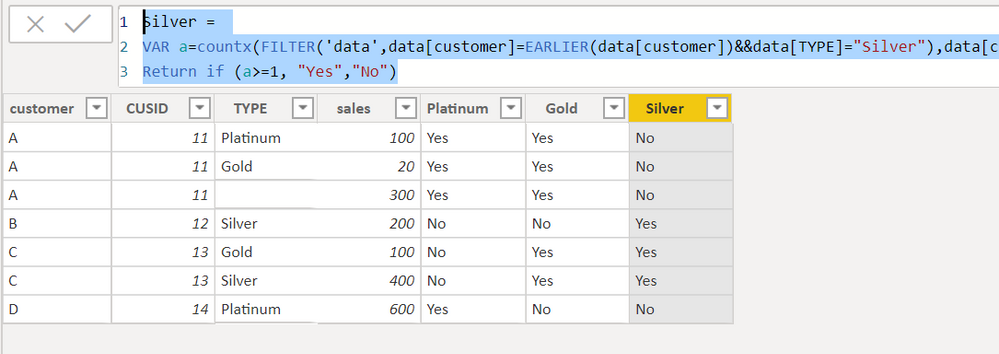
You can create three columns.


Platinum = 
VAR a=countx(FILTER('data',data[customer]=EARLIER(data[customer])&&data[TYPE]="Platinum"),data[customer])
Return if (a>=1, "Yes","No")
Gold = 
VAR a=countx(FILTER('data',data[customer]=EARLIER(data[customer])&&data[TYPE]="Gold"),data[customer])
Return if (a>=1, "Yes","No")
Silver = 
VAR a=countx(FILTER('data',data[customer]=EARLIER(data[customer])&&data[TYPE]="Silver"),data[customer])
Return if (a>=1, "Yes","No")

1.PNG2.PNG


Did I answer your question? Mark my post as a solution!

Proud to be a Super User!


View solution in original post

3 REPLIES 3
ryan_mayu
Super User
Super User

@Shaji 


You can create three columns.


Platinum = 
VAR a=countx(FILTER('data',data[customer]=EARLIER(data[customer])&&data[TYPE]="Platinum"),data[customer])
Return if (a>=1, "Yes","No")
Gold = 
VAR a=countx(FILTER('data',data[customer]=EARLIER(data[customer])&&data[TYPE]="Gold"),data[customer])
Return if (a>=1, "Yes","No")
Silver = 
VAR a=countx(FILTER('data',data[customer]=EARLIER(data[customer])&&data[TYPE]="Silver"),data[customer])
Return if (a>=1, "Yes","No")

1.PNG2.PNG


Did I answer your question? Mark my post as a solution!

Proud to be a Super User!


amitchandak
Super User
Super User

@Shaji ,

Try like

Type measure = coalesce(max(Table[Type]),"No")

Share with Power BI Enthusiasts: Full Power BI Video (20 Hours) YouTube
Microsoft Fabric Series 60+ Videos YouTube
Microsoft Fabric Hindi End to End YouTube

@amitchandak 


The result comes as:

Customer Platinum Gold Silver
A              Platinum Gold  No


instead of 


Customer Platinum Gold Silver
A              Yes           Yes   No

Helpful resources

Announcements
Join our Fabric User Panel

Join our Fabric User Panel

Share feedback directly with Fabric product managers, participate in targeted research studies and influence the Fabric roadmap.

February Power BI Update Carousel

Power BI Monthly Update - February 2026

Check out the February 2026 Power BI update to learn about new features.

FabCon Atlanta 2026 carousel

FabCon Atlanta 2026

Join us at FabCon Atlanta, March 16-20, for the ultimate Fabric, Power BI, AI and SQL community-led event. Save $200 with code FABCOMM.