Don't miss your chance to take the Fabric Data Engineer (DP-700) exam on us!
Learn moreNext up in the FabCon + SQLCon recap series: The roadmap for Microsoft SQL and Maximizing Developer experiences in Fabric. All sessions are available on-demand after the live show. Register now
Hello,
I'm looking to understand the following behavior:
I have the following meaures:
Actual Hours SUM = SUM('Job Details'[ActualHours])Actual Hours With Zero = VAR AH = SUM('Job Details'[ActualHours]) RETURN IF(AH = 0, 0, AH)
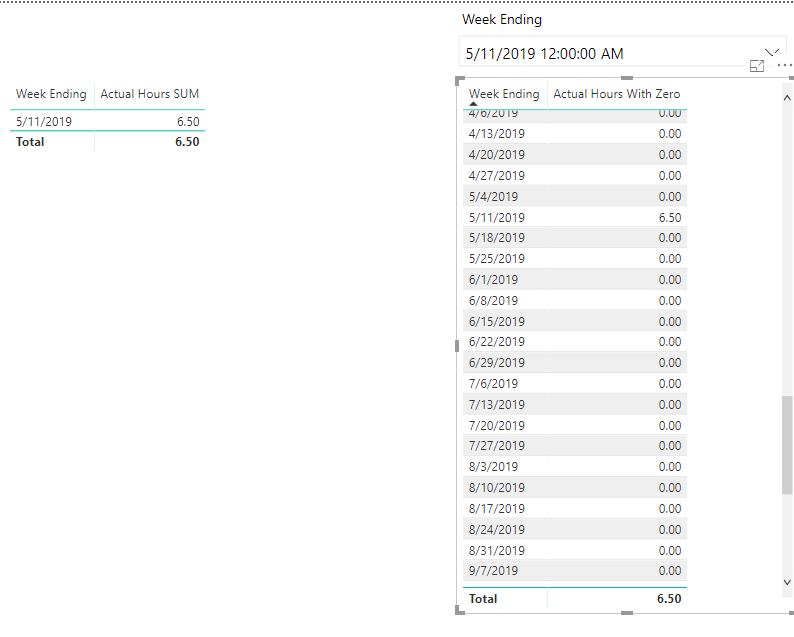
When I place these measures with a Date in a table as well as a slicer on the page, I get different side by side results.
Why does the Actual Hours With Zero Measure ignore the Week Ending slicer? The grand total is correct in both cases, but the table with the Actujal Hours With Zero measure is showing rows that I thought would be filtered out by the slicer? The purpose of Actual Hours With Zero is to show a 0 in situations where there is no total (blank).
Hi @Anonymous
In the second case your measure always returns a value so it will be shown, no matter what (it does override the filter, by design). You need blanks for the visual not to show anything for a specific date.
Hmm, I thought the purpose of the slicer was to change the display context? Why would a measure override this? Just looking to understand this. How do you handle scenarios where you want to show 0 as a value instead of blank? I can't filter the visual for zero values as it won't show 0 on days where it is 0.
What is the correct way to handle scenarios where you want to show a value as 0 instead of blank since a measure won't respect a filter.
In the previous screenshot, how would you show the value for a specific date (that's what I used the slicer for) when the value is blank but you want to show that as 0?
Hi @Anonymous
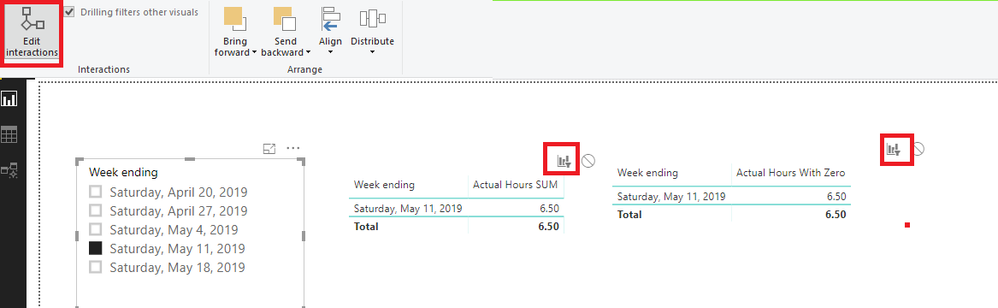
It seems you may check 'Edit interactions' for the slicer.If the two visuals are filtered by the slicer.The slicer would change the visual when you use no matter which measures.
Regards,
Hi v-cherch-msft,
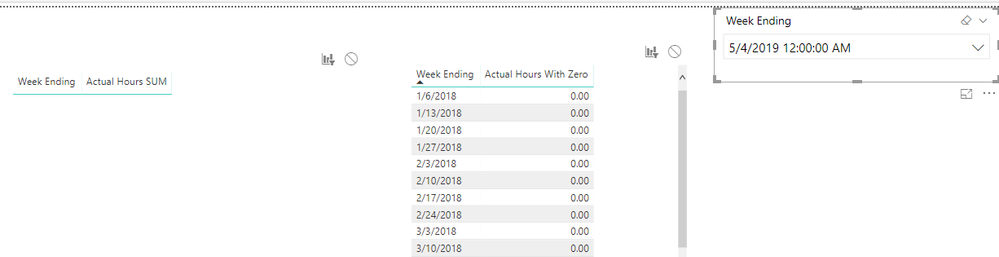
Filtering is the default behavior, and I simply dragged and dropped two tables onto the canvas followed by a slicer. Here is my file for reference. As you can see, the slicer is not filtering the meausre when I return 0 even the the table is filtered by the slicer.
Test file: Measure Behavior.pbix
Hi @Anonymous
It depends on the relationships.I would suggest you use WeekEnding Slicer table's week ending column in the table.
Reference:https://www.sqlbi.com/articles/bidirectional-relationships-and-ambiguity-in-dax/
Regards,
If you have recently started exploring Fabric, we'd love to hear how it's going. Your feedback can help with product improvements.
A new Power BI DataViz World Championship is coming this June! Don't miss out on submitting your entry.
Share feedback directly with Fabric product managers, participate in targeted research studies and influence the Fabric roadmap.
| User | Count |
|---|---|
| 48 | |
| 45 | |
| 41 | |
| 19 | |
| 18 |
| User | Count |
|---|---|
| 69 | |
| 69 | |
| 32 | |
| 32 | |
| 32 |