
Get certified for free when you join Fabric Data Days 2026 and dive into Fabric, Power BI, SQL, AI, and other essential data skills.
Join nowTry your skills in the Power BI Dataviz World Championship! Round one ends June 26. Join now
Hello all,
I have a problem with the DAX formula. I tried to see where my logic is wrong but i cannot find it. The formula is the following,
LPRD In Advance = CALCULATE(COUNTA(SAP_Transaction_ZP26[LPRD]),
FILTER(SAP_Transaction_ZP26,
SAP_Transaction_ZP26[PDCL].[MonthNo] = MONTH(TODAY()) &&
SAP_Transaction_ZP26[PDCL].[Year] = YEAR(TODAY()) &&
SAP_Transaction_ZP26[LPRD] < SAP_Transaction_ZP26[PDCL]),
SAP_Transaction_ZP26[LPRD] <> DATE(1900,1,1)) + 0
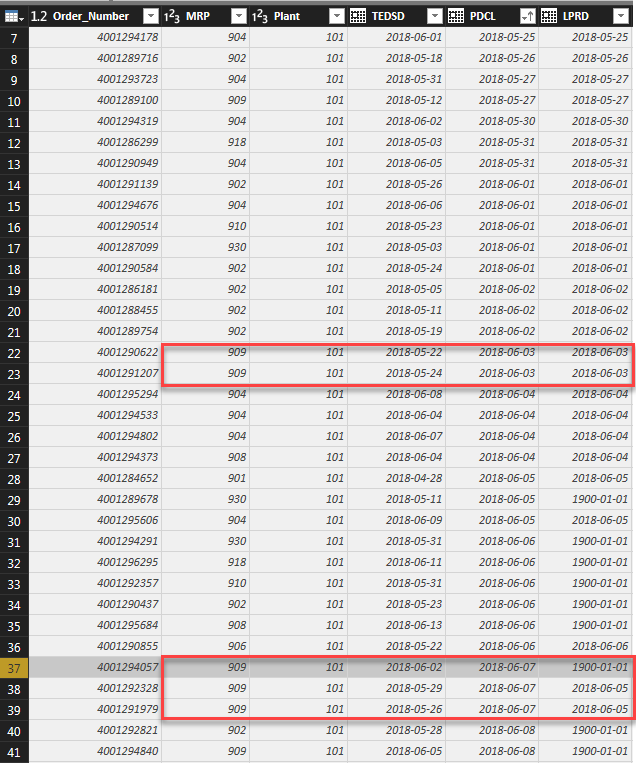
It follows this data table.
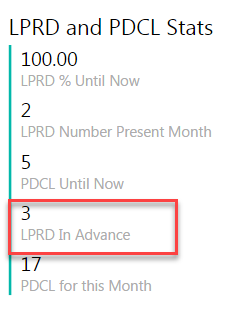
On my Dashboard, i have these
In the formula, I specifically said to not include the date of 1900/01/01 of LPRD, however it counts it. "LPRD In Advance" should be 2 instead of 3.
Thanks in Advance!
Solved! Go to Solution.
Hi @NaCl-y,
Please pay attention to the highlighted part.
LPRD In Advance =
CALCULATE (
COUNTA ( SAP_Transaction_ZP26[LPRD] ),
FILTER (
SAP_Transaction_ZP26,
SAP_Transaction_ZP26[PDCL].[MonthNo] = MONTH ( TODAY () )
&& SAP_Transaction_ZP26[PDCL].[Year] = YEAR ( TODAY () )
&& SAP_Transaction_ZP26[LPRD] < SAP_Transaction_ZP26[PDCL]
&& SAP_Transaction_ZP26[LPRD] <> DATE ( 1900, 1, 1 )
)
)
+ 0
Regards,
Yuliana Gu
Hi @NaCl-y,
Please pay attention to the highlighted part.
LPRD In Advance =
CALCULATE (
COUNTA ( SAP_Transaction_ZP26[LPRD] ),
FILTER (
SAP_Transaction_ZP26,
SAP_Transaction_ZP26[PDCL].[MonthNo] = MONTH ( TODAY () )
&& SAP_Transaction_ZP26[PDCL].[Year] = YEAR ( TODAY () )
&& SAP_Transaction_ZP26[LPRD] < SAP_Transaction_ZP26[PDCL]
&& SAP_Transaction_ZP26[LPRD] <> DATE ( 1900, 1, 1 )
)
)
+ 0
Regards,
Yuliana Gu
Any reason you didn't "and" that condition to your other conditions?
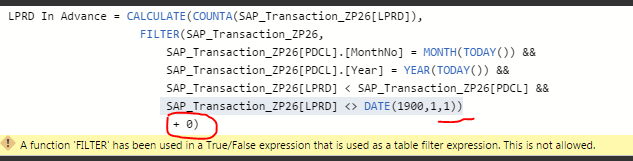
If you are talking about the SAP_Transaction_ZP26[LPRD] <> DATE(1900,1,1), it is because that gives me an error shown below.
Try changing your <> to >
Don't miss out on Data Days, June 15 through August 7. Learn Fabric, Power BI, SQL, AI and more.
Check out the May 2026 Power BI update to learn about new features.
| User | Count |
|---|---|
| 21 | |
| 21 | |
| 21 | |
| 19 | |
| 11 |
| User | Count |
|---|---|
| 59 | |
| 53 | |
| 40 | |
| 31 | |
| 26 |