Get certified for free when you join Fabric Data Days 2026 and dive into Fabric, Power BI, SQL, AI, and other essential data skills.
Join nowTry your skills in the Power BI Dataviz World Championship! Round one ends June 26. Join now
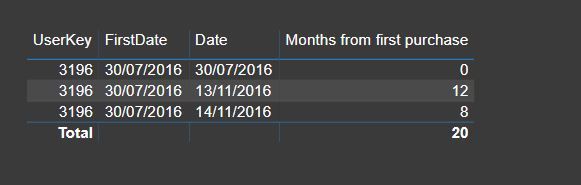
DATEDIFF doesn't show the expected difference. I am trying to calculate "Months from first purchase".
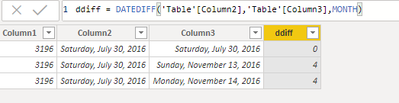
Both columns are the same date format. The difference I get is not correct.
This is a calcualted column:
Thanks,
Erez
Solved! Go to Solution.
It looks like you pulled that column into a visual and the field is set to SUM. My guess is the second line represents 3 records in your data set (4 months diff * 3 = 12) and the third line is covering 2 records. Try changing the field to show the AVERAGE.
Could it be your date format? I tried with MM/DD/YYYY format and DATEDIFF works perfectly fine.
Another alternate formula could be:
Hi @erezbenmoshe ,
Works here.
Proud to be a Super User!
It looks like you pulled that column into a visual and the field is set to SUM. My guess is the second line represents 3 records in your data set (4 months diff * 3 = 12) and the third line is covering 2 records. Try changing the field to show the AVERAGE.
You are right!! I am embarrassed that I did not figure it out myself 🙂
Don't miss out on Data Days, June 15 through August 7. Learn Fabric, Power BI, SQL, AI and more.
Check out the May 2026 Power BI update to learn about new features.
| User | Count |
|---|---|
| 23 | |
| 21 | |
| 20 | |
| 19 | |
| 13 |
| User | Count |
|---|---|
| 58 | |
| 52 | |
| 37 | |
| 31 | |
| 27 |