This time we’re going bigger than ever. Fabric, Power BI, SQL, AI and more. We're covering it all. You won't want to miss it.
Learn moreDid you hear? There's a new SQL AI Developer certification (DP-800). Start preparing now and be one of the first to get certified. Register now
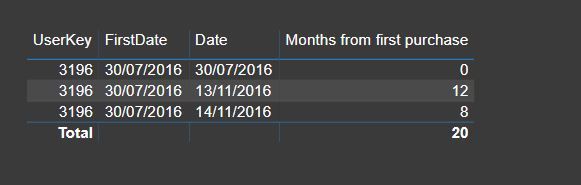
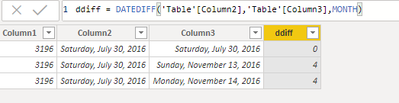
DATEDIFF doesn't show the expected difference. I am trying to calculate "Months from first purchase".
Both columns are the same date format. The difference I get is not correct.
This is a calcualted column:
Thanks,
Erez
Solved! Go to Solution.
It looks like you pulled that column into a visual and the field is set to SUM. My guess is the second line represents 3 records in your data set (4 months diff * 3 = 12) and the third line is covering 2 records. Try changing the field to show the AVERAGE.
Could it be your date format? I tried with MM/DD/YYYY format and DATEDIFF works perfectly fine.
Another alternate formula could be:
Hi @erezbenmoshe ,
Works here.
Proud to be a Super User!
It looks like you pulled that column into a visual and the field is set to SUM. My guess is the second line represents 3 records in your data set (4 months diff * 3 = 12) and the third line is covering 2 records. Try changing the field to show the AVERAGE.
You are right!! I am embarrassed that I did not figure it out myself 🙂
Check out the April 2026 Power BI update to learn about new features.
Sign up to receive a private message when registration opens and key events begin.
If you have recently started exploring Fabric, we'd love to hear how it's going. Your feedback can help with product improvements.
| User | Count |
|---|---|
| 34 | |
| 31 | |
| 25 | |
| 20 | |
| 16 |
| User | Count |
|---|---|
| 61 | |
| 49 | |
| 28 | |
| 23 | |
| 23 |