This time we’re going bigger than ever. Fabric, Power BI, SQL, AI and more. We're covering it all. You won't want to miss it.
Learn moreDid you hear? There's a new SQL AI Developer certification (DP-800). Start preparing now and be one of the first to get certified. Register now
Hi there,
is there a possibility to customize the numbers in a visual like for example: 81 abc ?
I´m looking for an equivalent in excel: #.##0,00 "abc"
I´m only able to model the figures in the pre-set formats like currency etc.
Thanks in advance
Felix
Hey,
I Know that this in not exactly what you want, but
you can use a measure like this:
--> create new measure.
--> type
yourMeasure = sum(Table1[Column1]) & "abc"
Thanks for your suggestion,
but as you mentioned I´m looking for a directly visible unit
Try using both format and concatenate at the same time
FORMAT(<Value to be formatted>,<Format Pattern>) & " " or
CONCATENATE(string_expression,CONCATENATE(string_expression,string_expression))
Not sure how to use your formula.. I´m not into DAX. Does it runs with a new Measure or where is the formala to put in?
Clik right on the left side "Field" and select new Measure, or find button in ribbon menu.
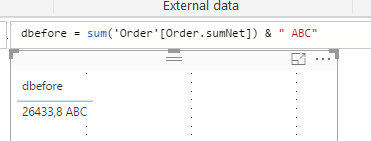
I did this already. The result is the following:
But my aim was to get the unit within the chart.
Ok, right now there is no built in function in PBI for this.
Check if this can help you:
greetings,
Wolf
Check out the April 2026 Power BI update to learn about new features.
Sign up to receive a private message when registration opens and key events begin.
If you have recently started exploring Fabric, we'd love to hear how it's going. Your feedback can help with product improvements.
| User | Count |
|---|---|
| 36 | |
| 33 | |
| 31 | |
| 21 | |
| 16 |
| User | Count |
|---|---|
| 66 | |
| 55 | |
| 31 | |
| 24 | |
| 23 |