This time we’re going bigger than ever. Fabric, Power BI, SQL, AI and more. We're covering it all. You won't want to miss it.
Learn moreDid you hear? There's a new SQL AI Developer certification (DP-800). Start preparing now and be one of the first to get certified. Register now
Hi there,
is there a possibility to customize the numbers in a visual like for example: 81 abc ?
I´m looking for an equivalent in excel: #.##0,00 "abc"
I´m only able to model the figures in the pre-set formats like currency etc.
Thanks in advance
Felix
Hey,
I Know that this in not exactly what you want, but
you can use a measure like this:
--> create new measure.
--> type
yourMeasure = sum(Table1[Column1]) & "abc"
Thanks for your suggestion,
but as you mentioned I´m looking for a directly visible unit
Try using both format and concatenate at the same time
FORMAT(<Value to be formatted>,<Format Pattern>) & " " or
CONCATENATE(string_expression,CONCATENATE(string_expression,string_expression))
Not sure how to use your formula.. I´m not into DAX. Does it runs with a new Measure or where is the formala to put in?
Clik right on the left side "Field" and select new Measure, or find button in ribbon menu.
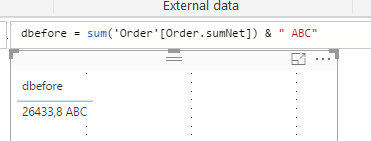
I did this already. The result is the following:
But my aim was to get the unit within the chart.
Ok, right now there is no built in function in PBI for this.
Check if this can help you:
greetings,
Wolf
Check out the April 2026 Power BI update to learn about new features.
If you have recently started exploring Fabric, we'd love to hear how it's going. Your feedback can help with product improvements.
A new Power BI DataViz World Championship is coming this June! Don't miss out on submitting your entry.
| User | Count |
|---|---|
| 38 | |
| 38 | |
| 31 | |
| 22 | |
| 15 |
| User | Count |
|---|---|
| 74 | |
| 61 | |
| 31 | |
| 31 | |
| 23 |