Join us at FabCon Atlanta from March 16 - 20, 2026, for the ultimate Fabric, Power BI, AI and SQL community-led event. Save $200 with code FABCOMM.
Register now!Vote for your favorite vizzies from the Power BI Dataviz World Championship submissions. Vote now!
Hello,
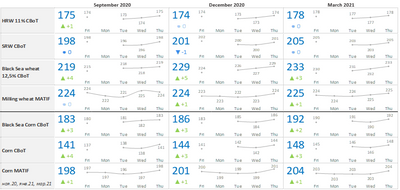
I created a chart table in Excel. This table shows the following:
- products' prices on a report day (big blue numbers)
- products' prices during a preceding week (line chart)
- difference between prices of the first day and the report day of the preceding week (green/blue/red numbers with a marker)
I need to create a similar table in Power BI.
Please advise me a suitable template chart or a way how I can realise this idea in Power BI? Thank you!
Hi there, this one will get you close:
Power KPI Matrix (microsoft.com)
I've used it quite often.
Proud to be a Super User!
Hi @OlegV ,
You can also try to use dynamic creation of Scalable Vector Graphics (SVG) images in Power BI. Here is an example:
SVG Sparklines - Categorical Columns - Microsoft Power BI Community.
Best Regards,
Icey
If this post helps, then please consider Accept it as the solution to help the other members find it more quickly.
@OlegV check for the custom visual in the app market and I'm sure there are visual that allows you to achieve the same.
✨ Follow us on LinkedIn
Check my latest blog post The Power of Using Calculation Groups with Inactive Relationships (Part 1) (perytus.com) I would ❤ Kudos if my solution helped. 👉 If you can spend time posting the question, you can also make efforts to give Kudos to whoever helped to solve your problem. It is a token of appreciation!
⚡ Visit us at https://perytus.com, your one-stop-shop for Power BI-related projects/training/consultancy.⚡
Subscribe to the @PowerBIHowTo YT channel for an upcoming video on List and Record functions in Power Query!!
Learn Power BI and Fabric - subscribe to our YT channel - Click here: @PowerBIHowTo
If my solution proved useful, I'd be delighted to receive Kudos. When you put effort into asking a question, it's equally thoughtful to acknowledge and give Kudos to the individual who helped you solve the problem. It's a small gesture that shows appreciation and encouragement! ❤
Did I answer your question? Mark my post as a solution. Proud to be a Super User! Appreciate your Kudos 🙂
Feel free to email me with any of your BI needs.
Vote for your favorite vizzies from the Power BI World Championship submissions!
If you love stickers, then you will definitely want to check out our Community Sticker Challenge!
Check out the January 2026 Power BI update to learn about new features.
| User | Count |
|---|---|
| 56 | |
| 53 | |
| 40 | |
| 17 | |
| 16 |
| User | Count |
|---|---|
| 122 | |
| 108 | |
| 44 | |
| 32 | |
| 26 |