Join us at FabCon Atlanta from March 16 - 20, 2026, for the ultimate Fabric, Power BI, AI and SQL community-led event. Save $200 with code FABCOMM.
Register now!The Power BI Data Visualization World Championships is back! Get ahead of the game and start preparing now! Learn more
Hello,
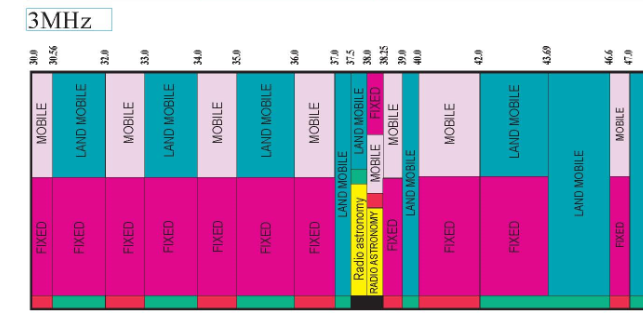
Can we create visual similar to this in power bi ?
In this visual they showed the service name between lowerlimit and upperlimit, if we have 2 service names in the same range, it shows both of them in that range.
full image
https://www.ntia.doc.gov/files/ntia/publications/january_2016_spectrum_wall_chart.pdf
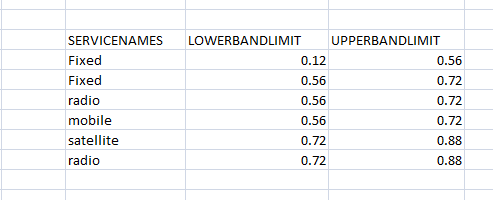
I have this information
In this, we can see between 0.56 & 0.72 , we have fixed and radio services & between 0.72 & 0.88 , we have satellite and radio.
I want to show this data like the 1st visual.
I have tried treemap but it is grouping all fixed values and showing limits as 0.12 & 0.72 .
But I need to show both values -
1st as 0.12-0.56 & 2nd as 0.56-0.72 and b/n 0.56-0.72 both fixed & radio
Solved! Go to Solution.
@dia612 , I doubt I have seen something like this
check if you can find something here
https://appsource.microsoft.com/en-us/marketplace/apps?product=power-bi-visuals
I dont think it is possibel with Tree Map.
What you can do is use Matrix Table.
Put your Upper Bound in Column
Put your Lower Bound in Rows
Put ServicesNames in Values (FirstValue)
Then do some color formatting. But values will not be showing in Vertical,
Proud to be a Super User!
@dia612 , I doubt I have seen something like this
check if you can find something here
https://appsource.microsoft.com/en-us/marketplace/apps?product=power-bi-visuals
The Power BI Data Visualization World Championships is back! Get ahead of the game and start preparing now!
| User | Count |
|---|---|
| 61 | |
| 43 | |
| 40 | |
| 38 | |
| 22 |
| User | Count |
|---|---|
| 178 | |
| 124 | |
| 116 | |
| 77 | |
| 54 |