This time we’re going bigger than ever. Fabric, Power BI, SQL, AI and more. We're covering it all. You won't want to miss it.
Learn moreJoin the FabCon + SQLCon recap series. Up next: Power BI, Real-Time Intelligence, IQ and AI, and Data Factory take center stage. All sessions are available on-demand after the live show. Register now
Hello all,
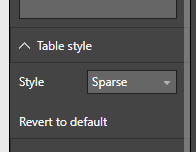
Is there currently a way to set a default style for the table visual using custom themes? I was looking through the documentation and could not find anything for it. If not, are there plans to implement it in the future?
Thanks.
Solved! Go to Solution.
Hey,
I use this JSON scheme to create a custom table style:
{"name":"nameOfScheme"
,"dataColors":["#43D3E8","#E86232","#9B4507","#46B29D","#324D5C","#FC4F71","#324DBF","#D9D9D9"]
,"background":"#FFFFFF"
,"foreground": "#324D5C"
,"tableAccent": "#324D5C"
,"visualStyles":
{"*":
{"*":
{"*":
[{
"fontSize":14
,"fontFamily":"Segoe UI"
,"color":{"solid":{"color":"#324D5C"}}
}]
,"general":
[{
"responsive":true
}]
,"plotArea":
[{
"transparency":50
}]
}
}
}
}Here you will find a the theme generator:
https://powerbi.tips/tools/report-theme-generator-v3/
And here is some guidance how to use custom themes:
https://docs.microsoft.com/en-us/power-bi/desktop-report-themes
Hopefully this is what you are looking for
Regards
Tom
What I was looking for is specifically this:
Check out the April 2026 Power BI update to learn about new features.
If you have recently started exploring Fabric, we'd love to hear how it's going. Your feedback can help with product improvements.
A new Power BI DataViz World Championship is coming this June! Don't miss out on submitting your entry.
| User | Count |
|---|---|
| 40 | |
| 37 | |
| 31 | |
| 23 | |
| 15 |
| User | Count |
|---|---|
| 76 | |
| 59 | |
| 31 | |
| 31 | |
| 25 |