Join us at FabCon Atlanta from March 16 - 20, 2026, for the ultimate Fabric, Power BI, AI and SQL community-led event. Save $200 with code FABCOMM.
Register now!Learn from the best! Meet the four finalists headed to the FINALS of the Power BI Dataviz World Championships! Register now
Hello all,
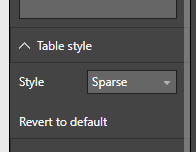
Is there currently a way to set a default style for the table visual using custom themes? I was looking through the documentation and could not find anything for it. If not, are there plans to implement it in the future?
Thanks.
Solved! Go to Solution.
Hey,
I use this JSON scheme to create a custom table style:
{"name":"nameOfScheme"
,"dataColors":["#43D3E8","#E86232","#9B4507","#46B29D","#324D5C","#FC4F71","#324DBF","#D9D9D9"]
,"background":"#FFFFFF"
,"foreground": "#324D5C"
,"tableAccent": "#324D5C"
,"visualStyles":
{"*":
{"*":
{"*":
[{
"fontSize":14
,"fontFamily":"Segoe UI"
,"color":{"solid":{"color":"#324D5C"}}
}]
,"general":
[{
"responsive":true
}]
,"plotArea":
[{
"transparency":50
}]
}
}
}
}Here you will find a the theme generator:
https://powerbi.tips/tools/report-theme-generator-v3/
And here is some guidance how to use custom themes:
https://docs.microsoft.com/en-us/power-bi/desktop-report-themes
Hopefully this is what you are looking for
Regards
Tom
What I was looking for is specifically this:
Share feedback directly with Fabric product managers, participate in targeted research studies and influence the Fabric roadmap.
Check out the February 2026 Power BI update to learn about new features.
| User | Count |
|---|---|
| 61 | |
| 59 | |
| 42 | |
| 18 | |
| 15 |
| User | Count |
|---|---|
| 107 | |
| 100 | |
| 38 | |
| 29 | |
| 29 |