Learn from the best! Meet the four finalists headed to the FINALS of the Power BI Dataviz World Championships! Register now
Hello everyone,
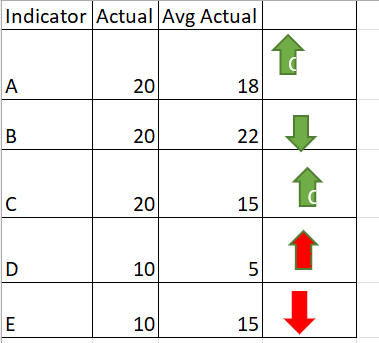
how can i active below data icons in power bi.
For Indicator (A) Actual is greater than Avg Actual i need to have up arrow with green colour
For Indicator (B) Actual is less than Avg Actual i need to have down arrow with green colour
For Indicator (C) Actual is greater than Avg Actual i need to have up arrow with green
For indicator (D) Actual is greater than Avg Actual i need to have up arrow with red
For indicator (E) Actual is less than Avg Actual i need to have down arrow with red
Solved! Go to Solution.
Hi @_Abhilash ,
You can try to create a measure with your scenarios and give it a value. For example,
CondiIcons =
VAR _Actual = YOUR_ACTUAL_SUM_MEASURE
VAR _Avg = YOUR_AVG_MEASURE
VAR _Indicator = MAX(YOUR_TABLE[Indicator])
RETURN
SWITCH( TRUE(),
_Indicator = "A" && _Actual > _Avg, 1, // Green Up
_Indicator = "B" && _Actual < _Avg, 2, // Green Down
_Indicator = "C" && _Actual > _Avg, 1, // Green Up
_Indicator = "D" && _Actual > _Avg, 3, // Red Up
_Indicator = "E" && _Actual < _Avg, 4 // Red Down
)
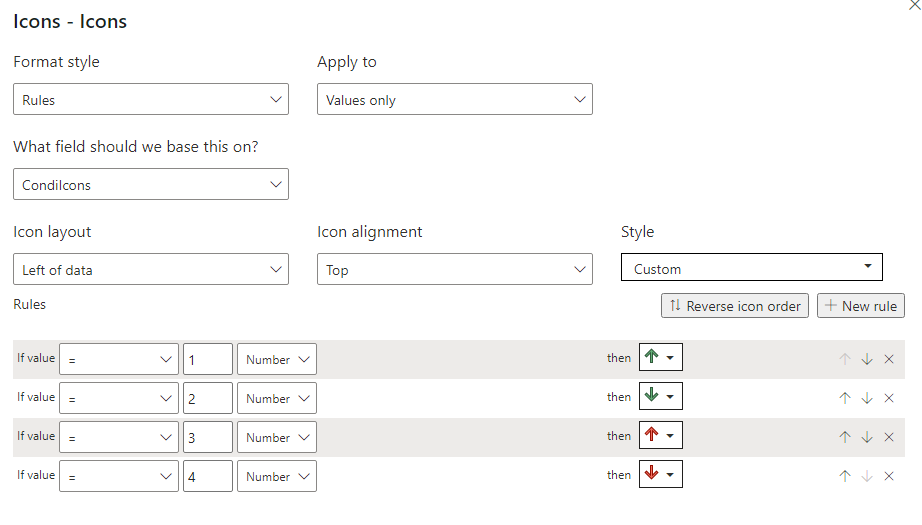
Then in the conditional format settings, turn on Icons and have the setting to this:
Let me know if this is what you're looking for.
Hi @_Abhilash
You can try this, create the 2 measures below,
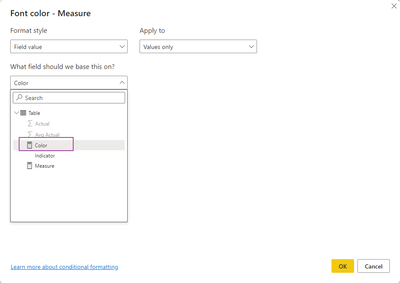
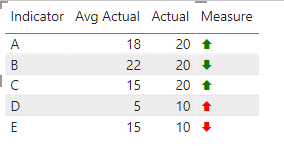
Measure = IF(MIN('Table'[Actual])>MIN('Table'[Avg Actual]), UNICHAR(129093),UNICHAR(129095))Color = IF(MIN('Table'[Indicator]) in {"A","B","C"}, "green","red")
result
Best Regards,
Community Support Team _Tang
If this post helps, please consider Accept it as the solution to help the other members find it more quickly.
Hi @_Abhilash
You can try this, create the 2 measures below,
Measure = IF(MIN('Table'[Actual])>MIN('Table'[Avg Actual]), UNICHAR(129093),UNICHAR(129095))Color = IF(MIN('Table'[Indicator]) in {"A","B","C"}, "green","red")
result
Best Regards,
Community Support Team _Tang
If this post helps, please consider Accept it as the solution to help the other members find it more quickly.
Hi @_Abhilash ,
You can try to create a measure with your scenarios and give it a value. For example,
CondiIcons =
VAR _Actual = YOUR_ACTUAL_SUM_MEASURE
VAR _Avg = YOUR_AVG_MEASURE
VAR _Indicator = MAX(YOUR_TABLE[Indicator])
RETURN
SWITCH( TRUE(),
_Indicator = "A" && _Actual > _Avg, 1, // Green Up
_Indicator = "B" && _Actual < _Avg, 2, // Green Down
_Indicator = "C" && _Actual > _Avg, 1, // Green Up
_Indicator = "D" && _Actual > _Avg, 3, // Red Up
_Indicator = "E" && _Actual < _Avg, 4 // Red Down
)
Then in the conditional format settings, turn on Icons and have the setting to this:
Let me know if this is what you're looking for.
@hnguy71 thanks for the solution.
i have i have 26 inidcators from A to Z, Any other option aprart from using switch because if i use switch i need to enter 26 inidcators manually.
Thanks & Regards
Abhilash.P
Hi @_Abhilash ,
Sure it's possible to use a configuration dimension with a relationship to your indicators to get the right colors and icons, or if you can understand your patterns a bit more we can remove your indicators totally. Currently it's unclear how you're coming up with the logic for your arrows.
1. Why is D an up red arrow against A which follows the same pattern?
2. Why is E a down red arrow when A also follows the same pattern?
| User | Count |
|---|---|
| 60 | |
| 46 | |
| 32 | |
| 16 | |
| 16 |
| User | Count |
|---|---|
| 82 | |
| 68 | |
| 43 | |
| 26 | |
| 23 |