cancel
Showing results for 
Search instead for 
Did you mean: 

Join the FabCon + SQLCon recap series. Up next: Power BI, Real-Time Intelligence, IQ and AI, and Data Factory take center stage. All sessions are available on-demand after the live show. Register now

Reply
_Abhilash
Helper I
Helper I

Custom Data bars

Hello everyone,

how can i active below  data icons in power bi.
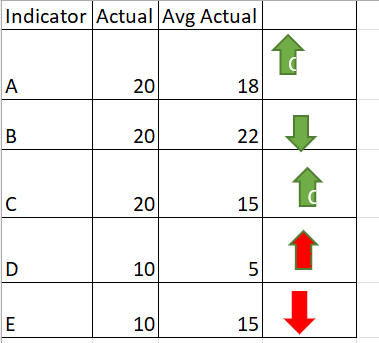
For Indicator (A)  Actual is greater than Avg Actual i need to  have up arrow with green colour
For Indicator (BActual is less than Avg Actual i need to have down arrow with green colour
For Indicator (CActual is greater than Avg Actual i need to have up arrow with green
For indicator (D) Actual is greater than Avg Actual i need to have up arrow with red
For indicator (E) Actual is less than Avg Actual i need to have down arrow with red

_Abhilash_2-1653141164510.png


2 ACCEPTED SOLUTIONS
hnguy71
Super User
Super User

Hi @_Abhilash ,


You can try to create a measure with your scenarios and give it a value. For example,

CondiIcons = 

VAR _Actual = YOUR_ACTUAL_SUM_MEASURE
VAR _Avg = YOUR_AVG_MEASURE
VAR _Indicator = MAX(YOUR_TABLE[Indicator]) 

RETURN

SWITCH( TRUE(),
_Indicator = "A" && _Actual > _Avg, 1,      // Green Up
_Indicator = "B" && _Actual < _Avg, 2,      // Green Down
_Indicator = "C" && _Actual > _Avg, 1,      // Green Up
_Indicator = "D" && _Actual > _Avg, 3,      // Red Up
_Indicator = "E" && _Actual < _Avg, 4       // Red Down
)


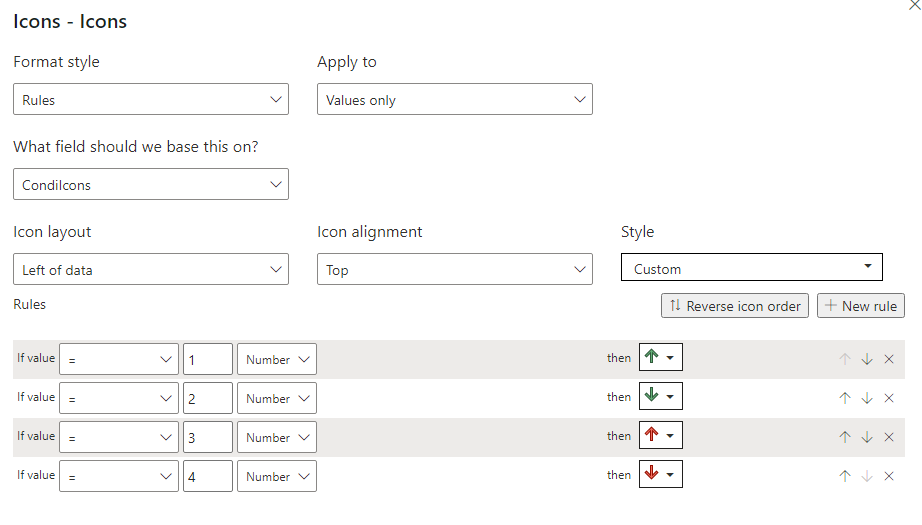
Then in the conditional format settings, turn on Icons and have the setting to this:

hnguy71_0-1653142527208.png

Let me know if this is what you're looking for.


Did I answer your question?
Please help by clicking the thumbs up button and mark my post as a solution!

View solution in original post

v-xiaotang
Community Support
Community Support

Hi @_Abhilash 

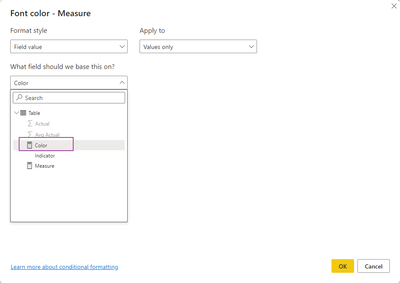
You can try this, create the 2 measures below,

Measure = IF(MIN('Table'[Actual])>MIN('Table'[Avg Actual]), UNICHAR(129093),UNICHAR(129095))
Color = IF(MIN('Table'[Indicator]) in {"A","B","C"}, "green","red")

vxiaotang_1-1653372508544.png

vxiaotang_2-1653372530033.png


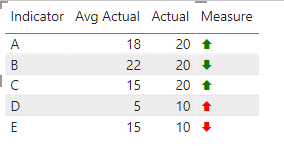
result

vxiaotang_0-1653372473800.png

Best Regards,

Community Support Team _Tang

If this post helps, please consider Accept it as the solution to help the other members find it more quickly.

View solution in original post

4 REPLIES 4
v-xiaotang
Community Support
Community Support

Hi @_Abhilash 

You can try this, create the 2 measures below,

Measure = IF(MIN('Table'[Actual])>MIN('Table'[Avg Actual]), UNICHAR(129093),UNICHAR(129095))
Color = IF(MIN('Table'[Indicator]) in {"A","B","C"}, "green","red")

vxiaotang_1-1653372508544.png

vxiaotang_2-1653372530033.png


result

vxiaotang_0-1653372473800.png

Best Regards,

Community Support Team _Tang

If this post helps, please consider Accept it as the solution to help the other members find it more quickly.

hnguy71
Super User
Super User

Hi @_Abhilash ,


You can try to create a measure with your scenarios and give it a value. For example,

CondiIcons = 

VAR _Actual = YOUR_ACTUAL_SUM_MEASURE
VAR _Avg = YOUR_AVG_MEASURE
VAR _Indicator = MAX(YOUR_TABLE[Indicator]) 

RETURN

SWITCH( TRUE(),
_Indicator = "A" && _Actual > _Avg, 1,      // Green Up
_Indicator = "B" && _Actual < _Avg, 2,      // Green Down
_Indicator = "C" && _Actual > _Avg, 1,      // Green Up
_Indicator = "D" && _Actual > _Avg, 3,      // Red Up
_Indicator = "E" && _Actual < _Avg, 4       // Red Down
)


Then in the conditional format settings, turn on Icons and have the setting to this:

hnguy71_0-1653142527208.png

Let me know if this is what you're looking for.


Did I answer your question?
Please help by clicking the thumbs up button and mark my post as a solution!

@hnguy71  thanks for the solution.
i have i have 26 inidcators from A to Z, Any other option aprart from using switch because if i use switch i need to enter 26 inidcators manually.


Thanks & Regards

Abhilash.P

Hi @_Abhilash ,


Sure it's possible to use a configuration dimension with a relationship to your indicators to get the right colors and icons, or if you can understand your patterns a bit more we can remove your indicators totally. Currently it's unclear how you're coming up with the logic for your arrows. 


1. Why is D an up red arrow against A which follows the same pattern?
2. Why is E a down red arrow when A also follows the same pattern?


Did I answer your question?
Please help by clicking the thumbs up button and mark my post as a solution!

Helpful resources

Announcements
April Power BI Update Carousel

Power BI Monthly Update - April 2026

Check out the April 2026 Power BI update to learn about new features.

New to Fabric survey Carousel

New to Fabric Survey

If you have recently started exploring Fabric, we'd love to hear how it's going. Your feedback can help with product improvements.

Power BI DataViz World Championships carousel

Power BI DataViz World Championships - June 2026

A new Power BI DataViz World Championship is coming this June! Don't miss out on submitting your entry.

FabCon and SQLCon Highlights Carousel

FabCon &SQLCon Highlights

Experience the highlights from FabCon & SQLCon, available live and on-demand starting April 14th.