cancel
Showing results for 
Search instead for 
Did you mean: 

July 7 - July 17 | Round 2 of the Power BI Dataviz World Championships. Don't miss your chance! Learn more

Reply
sfurr999
Regular Visitor

Custom Column using single value from another table

First off, I will lead with the "I'm a complete n00b to Power BI" disclaimer....


I have two datasets.  One (McAfeeDATData) contains data with many rows (example below)

McAfee DAT Data.png

The other (McAfeeDAT) has one row with one value

McAfee DAT.png

I want to create a custom column for the first table that shows "Compliant" if the VSEDATVersion column is greater than the value of Latest DAT (Second data source) minus 5.  So something along the lines of

IF('McAfeeDATData'[VSEDATVersion] > ('McAfeeDAT'[Latest DAT] - 5), "Compliant", "NonCompliant")

When I try this, I get an error trying to reference the McAfeeDAT table because there is no relationship.  Obviously, I can't create a relationship because there are no common fields.  Is this possible to do with DAX?


1 ACCEPTED SOLUTION

I finally ended up going with Import instead of Direct Query to gain the additional functionality I needed.  Problem solved.

View solution in original post

3 REPLIES 3
DoubleJ
Solution Supplier
Solution Supplier

Hi

Please try this formula


Spalte = IF(
    McAfeeDATData[VSEDATVersion] > VALUES(McAFeeDAT[Latest DAT]) -5,
"Compliant",
"NonCompliant")

In the special case when you know that you only got one value in the table, VALUES retrieves just that.


Hope this helps (if so, please give a kudo)
JJ

Thanks for the reply DoubleJ!

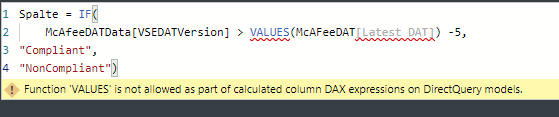
I had tried using VALUE before.  I get the error below

McAfee DAT Error.png

I finally ended up going with Import instead of Direct Query to gain the additional functionality I needed.  Problem solved.

Helpful resources

Announcements
FabCon and SQLCon Barcelona 2026

FabCon & SQLCon – Barcelona 2026

Join us in Barcelona for FabCon and SQLCon, the Fabric, Power BI, SQL, and AI community event. Save €200 with code FABCMTY200.

60 days of Data Days Carousel

Data Days 2026

Join Fabric Data Days 2026: 60 days of free live/on-demand sessions, challenges, study groups, and certification opportunities.

Power BI DataViz World Championships carousel

Power BI DataViz World Championships - June 2026

A new Power BI DataViz World Championship is coming this June! Don't miss out on submitting your entry.