cancel
Showing results for 
Search instead for 
Did you mean: 

July 28 - August 9 | Final Round of the Power BI Dataviz World Championships. This is your chance. Learn more

Reply
sfurr999
Regular Visitor

Custom Column using single value from another table

First off, I will lead with the "I'm a complete n00b to Power BI" disclaimer....


I have two datasets.  One (McAfeeDATData) contains data with many rows (example below)

McAfee DAT Data.png

The other (McAfeeDAT) has one row with one value

McAfee DAT.png

I want to create a custom column for the first table that shows "Compliant" if the VSEDATVersion column is greater than the value of Latest DAT (Second data source) minus 5.  So something along the lines of

IF('McAfeeDATData'[VSEDATVersion] > ('McAfeeDAT'[Latest DAT] - 5), "Compliant", "NonCompliant")

When I try this, I get an error trying to reference the McAfeeDAT table because there is no relationship.  Obviously, I can't create a relationship because there are no common fields.  Is this possible to do with DAX?


1 ACCEPTED SOLUTION

I finally ended up going with Import instead of Direct Query to gain the additional functionality I needed.  Problem solved.

View solution in original post

3 REPLIES 3
DoubleJ
Solution Supplier
Solution Supplier

Hi

Please try this formula


Spalte = IF(
    McAfeeDATData[VSEDATVersion] > VALUES(McAFeeDAT[Latest DAT]) -5,
"Compliant",
"NonCompliant")

In the special case when you know that you only got one value in the table, VALUES retrieves just that.


Hope this helps (if so, please give a kudo)
JJ

Thanks for the reply DoubleJ!

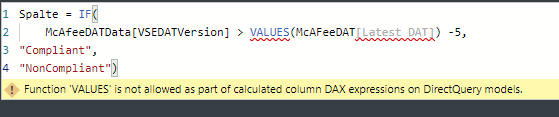
I had tried using VALUE before.  I get the error below

McAfee DAT Error.png

I finally ended up going with Import instead of Direct Query to gain the additional functionality I needed.  Problem solved.

Helpful resources

Announcements
FabCon and SQLCon Barcelona 2026

FabCon & SQLCon – Barcelona 2026

Join us in Barcelona for FabCon and SQLCon, the Fabric, Power BI, SQL, and AI community event. Save €200 with code FABCMTY200.

Fabric Community Sticker Design Challenge Barcelona Carousel

Fabric Community Sticker Challenge - Barcelona 2026

If you love stickers, then you will definitely want to check out our community sticker challenge, Barcelona edition!

July Power BI Update Carousel

Power BI Monthly Update - July 2026

Check out the July 2026 Power BI update to learn about new features.

Power BI DataViz World Championships carousel

Power BI DataViz World Championships - June 2026

A new Power BI DataViz World Championship is coming this June! Don't miss out on submitting your entry.

Top Solution Authors