Get certified for free when you join Fabric Data Days 2026 and dive into Fabric, Power BI, SQL, AI, and other essential data skills.
Join nowJuly 28 - August 9 | Final Round of the Power BI Dataviz World Championships. This is your chance. Learn more
I could use some help trying to figure out how to...properly count/aggregate data from two tables.
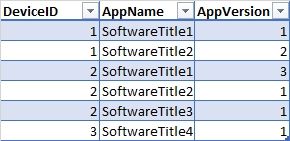
Let's say I have a table called SoftwareInstalled, similar to this:
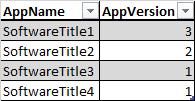
And I have a Target table like this:
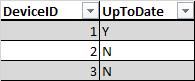
I'd like to add a calculated column or create some (aggregate?) table that gives me this:
I'm pretty new to PowerBI, and I've tried searching for some pointers/tutorial that points me in the right direction, but no luck so far. Is this doable in PowerBI?
Solved! Go to Solution.
@Anonymous ,
You may use Merge Queries (Table.NestedJoin) in Query Editor or LOOKUPVALUE Function in DAX.
@Anonymous ,
You may use Merge Queries (Table.NestedJoin) in Query Editor or LOOKUPVALUE Function in DAX.
If you love stickers, then you will definitely want to check out our community sticker challenge, Barcelona edition!
Check out the July 2026 Power BI update to learn about new features.
| User | Count |
|---|---|
| 30 | |
| 28 | |
| 23 | |
| 21 | |
| 19 |
| User | Count |
|---|---|
| 40 | |
| 31 | |
| 18 | |
| 18 | |
| 15 |