Join us at FabCon Atlanta from March 16 - 20, 2026, for the ultimate Fabric, Power BI, AI and SQL community-led event. Save $200 with code FABCOMM.
Register now!The Power BI Data Visualization World Championships is back! Get ahead of the game and start preparing now! Learn more
Hi
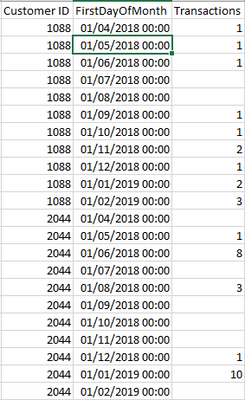
I have a table that contains data that looks like this:
Where I am tracking monthly transactions by Customer. I've included the first day of the month to aid sorting etc.
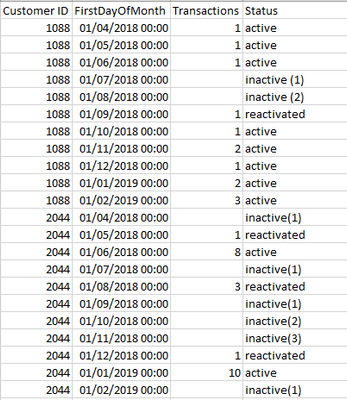
What I'd like to do is to apply a custom column to this so I can derive an activity status for each customer by month. So, for example:
If the customer has transacted = 'active'
If they have not transacted = 'inactive (x)' - where x is the number of months they have been inactive for
If they have transacted again after at least one inactive month = 'reactivated'
The output would look something like this:
I'm assuming DAX is the best method to do this but I'm a little stuck as to where to start. Any help gratefully received.
Solved! Go to Solution.
@m_richardson , you need new column like
var _max = maxx(filter(Table, Table[Customer ID] = earlier([Customer ID]) && [First Day Month] < earlier([First Day Month])),[First Day Month])
var _value = maxx(filter(Table, Table[Customer ID] = earlier([Customer ID]) && [First Day Month]=_max),[Transactions])
return
Switch( True(),
isblank(_max) && isblank([Transactions]), "Inactive",
isblank(_max) && not(isblank([Transactions])), "active",
not(isblank(_max)) && (isblank(_value)) && not(isblank([Transactions])), "reactive",
not(isblank([Transactions])), "active",
"Inactive"
)
for inctive count you need
Continuous streak : https://youtu.be/GdMcwvdwr0o
@m_richardson , you need new column like
var _max = maxx(filter(Table, Table[Customer ID] = earlier([Customer ID]) && [First Day Month] < earlier([First Day Month])),[First Day Month])
var _value = maxx(filter(Table, Table[Customer ID] = earlier([Customer ID]) && [First Day Month]=_max),[Transactions])
return
Switch( True(),
isblank(_max) && isblank([Transactions]), "Inactive",
isblank(_max) && not(isblank([Transactions])), "active",
not(isblank(_max)) && (isblank(_value)) && not(isblank([Transactions])), "reactive",
not(isblank([Transactions])), "active",
"Inactive"
)
for inctive count you need
Continuous streak : https://youtu.be/GdMcwvdwr0o
Hi @amitchandak - this works for active and inactive, but not reactivated for some reason.
Apologies - please ignore, I managed to get it to work. Great solution (and I learned something about the EARLIER function as well, so that's a bonus).
Thanks!
The Power BI Data Visualization World Championships is back! Get ahead of the game and start preparing now!
| User | Count |
|---|---|
| 38 | |
| 35 | |
| 33 | |
| 32 | |
| 29 |
| User | Count |
|---|---|
| 134 | |
| 96 | |
| 78 | |
| 67 | |
| 65 |