Don't miss your chance to take the Fabric Data Engineer (DP-600) exam for FREE! Find out how by attending the DP-600 session on April 23rd (pacific time), live or on-demand.
Learn moreNext up in the FabCon + SQLCon recap series: The roadmap for Microsoft SQL and Maximizing Developer experiences in Fabric. All sessions are available on-demand after the live show. Register now
Hi
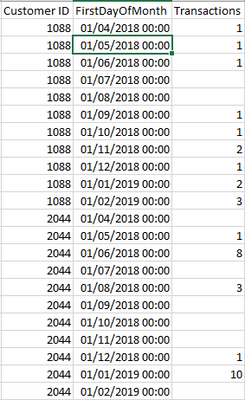
I have a table that contains data that looks like this:
Where I am tracking monthly transactions by Customer. I've included the first day of the month to aid sorting etc.
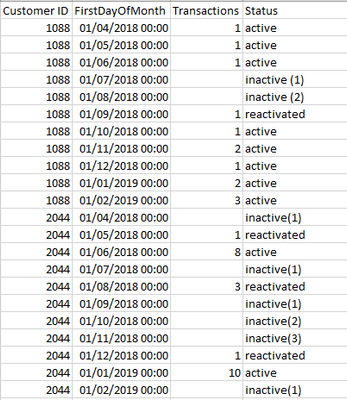
What I'd like to do is to apply a custom column to this so I can derive an activity status for each customer by month. So, for example:
If the customer has transacted = 'active'
If they have not transacted = 'inactive (x)' - where x is the number of months they have been inactive for
If they have transacted again after at least one inactive month = 'reactivated'
The output would look something like this:
I'm assuming DAX is the best method to do this but I'm a little stuck as to where to start. Any help gratefully received.
Solved! Go to Solution.
@m_richardson , you need new column like
var _max = maxx(filter(Table, Table[Customer ID] = earlier([Customer ID]) && [First Day Month] < earlier([First Day Month])),[First Day Month])
var _value = maxx(filter(Table, Table[Customer ID] = earlier([Customer ID]) && [First Day Month]=_max),[Transactions])
return
Switch( True(),
isblank(_max) && isblank([Transactions]), "Inactive",
isblank(_max) && not(isblank([Transactions])), "active",
not(isblank(_max)) && (isblank(_value)) && not(isblank([Transactions])), "reactive",
not(isblank([Transactions])), "active",
"Inactive"
)
for inctive count you need
Continuous streak : https://youtu.be/GdMcwvdwr0o
@m_richardson , you need new column like
var _max = maxx(filter(Table, Table[Customer ID] = earlier([Customer ID]) && [First Day Month] < earlier([First Day Month])),[First Day Month])
var _value = maxx(filter(Table, Table[Customer ID] = earlier([Customer ID]) && [First Day Month]=_max),[Transactions])
return
Switch( True(),
isblank(_max) && isblank([Transactions]), "Inactive",
isblank(_max) && not(isblank([Transactions])), "active",
not(isblank(_max)) && (isblank(_value)) && not(isblank([Transactions])), "reactive",
not(isblank([Transactions])), "active",
"Inactive"
)
for inctive count you need
Continuous streak : https://youtu.be/GdMcwvdwr0o
Hi @amitchandak - this works for active and inactive, but not reactivated for some reason.
Apologies - please ignore, I managed to get it to work. Great solution (and I learned something about the EARLIER function as well, so that's a bonus).
Thanks!
Check out the April 2026 Power BI update to learn about new features.
If you have recently started exploring Fabric, we'd love to hear how it's going. Your feedback can help with product improvements.
A new Power BI DataViz World Championship is coming this June! Don't miss out on submitting your entry.
| User | Count |
|---|---|
| 48 | |
| 46 | |
| 41 | |
| 20 | |
| 17 |
| User | Count |
|---|---|
| 70 | |
| 69 | |
| 32 | |
| 27 | |
| 26 |