This is best Fabric, Power BI, SQL and AI community event. How do we know? The last event sold out! Save €200 with code FABCMTY200.
Register nowThe Fabric community is now in read-only for platform upgrade. Learn more
Morning,
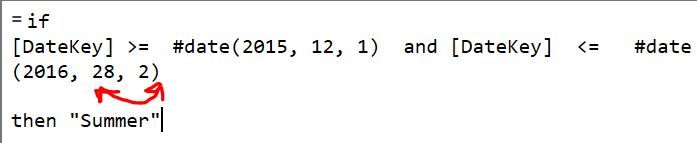
In my date table I'm trying to create a Custom column which list for between specific dates what season it is (Summer, Winter, etc). When I try to apply the custom column if function operation, I recieve the error:
Expression.Error: The Date operation failed because the resulting value falls outside the range of allowed values.
I've attached my pbix if anyone has any idea, my dates all line up so I'm not sure where I'm going wrong.
The date table is the only table and is titled "ExtendedCalendar" and the Custom Column under consideration is "Custom Two" in the applied steps or the "Season" column.
Link: https://1drv.ms/u/s!At8Q-ZbRnAj8hxgo1rirCX3x5CaM
Solved! Go to Solution.
Hi there, put this code into a Custom Column
if [Month Name] = "December" or [Month Name] = "January" or [Month Name] = "February" then "Summer" else if [Month Name] = "March" or [Month Name] = "April" or [Month Name] = "May" then "Autumn" else if [Month Name] = "June" or [Month Name] = "July" or [Month Name] = "August" then "Winter" else if [Month Name] = "September" or [Month Name] = "October" or [Month Name] = "November" then "Spring" else "NA"
This should work better because it does not take into account each year, so it will work on your entire date table.
@pawel1thanks, I tried that and it didn't work.
@GilbertQyour solution is best for the moment, thank you very much (especially for the outside the box thinking).
@v-ljerr-msftSorry, busy times.
Hi there, put this code into a Custom Column
if [Month Name] = "December" or [Month Name] = "January" or [Month Name] = "February" then "Summer" else if [Month Name] = "March" or [Month Name] = "April" or [Month Name] = "May" then "Autumn" else if [Month Name] = "June" or [Month Name] = "July" or [Month Name] = "August" then "Winter" else if [Month Name] = "September" or [Month Name] = "October" or [Month Name] = "November" then "Spring" else "NA"
This should work better because it does not take into account each year, so it will work on your entire date table.
Join us in Barcelona for FabCon and SQLCon, the Fabric, Power BI, SQL, and AI community event. Save €200 with code FABCMTY200.
| User | Count |
|---|---|
| 23 | |
| 22 | |
| 14 | |
| 14 | |
| 13 |
| User | Count |
|---|---|
| 47 | |
| 39 | |
| 24 | |
| 20 | |
| 20 |