cancel
Showing results for 
Search instead for 
Did you mean: 

The Power BI Data Visualization World Championships is back! Get ahead of the game and start preparing now! Learn more

Reply
ElliotP
Post Prodigy
Post Prodigy

Custom Column In PowerQuery If functions for Seasons

Morning,


In my date table I'm trying to create a Custom column which list for between specific dates what season it is (Summer, Winter, etc). When I try to apply the custom column if function operation, I recieve the error:


Expression.Error: The Date operation failed because the resulting value falls outside the range of allowed values.

I've attached my pbix if anyone has any idea, my dates all line up so I'm not sure where I'm going wrong.


The date table is the only table and is titled "ExtendedCalendar" and the Custom Column under consideration is "Custom Two" in the applied steps or the "Season" column.


Link: https://1drv.ms/u/s!At8Q-ZbRnAj8hxgo1rirCX3x5CaM

1 ACCEPTED SOLUTION

Hi there, put this code into a Custom Column


if [Month Name] = "December" or [Month Name] = "January" or [Month Name] = "February"  then "Summer" 

else if [Month Name] = "March" or [Month Name] = "April" or [Month Name] = "May"  then "Autumn"

else if [Month Name] = "June" or [Month Name] = "July" or [Month Name] = "August"  then "Winter"

else if [Month Name] = "September" or [Month Name] = "October" or [Month Name] = "November"  then "Spring"


else "NA"

This should work better because it does not take into account each year, so it will work on your entire date table.


Did I answer your question? Mark my post as a solution!

Proud to be a Super User!


Power BI Blog

View solution in original post

5 REPLIES 5
nazaar89
New Member

Please guide , how to add new column for seasons name based on Month column, like summer, winter, autumn, and spring.


nazaar89_0-1709644101129.png


v-ljerr-msft
Microsoft Employee
Microsoft Employee

Hi @ElliotP,


Have you tried the solution provided by @GilbertQ above? It should work in your scenario. If it works, could you accept it as solution to close this thread?


If you still have any question on this issue, feel free to post here. Smiley Happy


Regards

pawel1
Kudo Kingpin
Kudo Kingpin


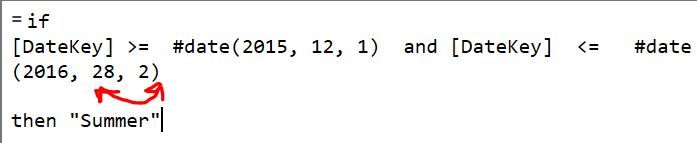
Hi Elliot, I think the error is caused by the sequence in your February date: YYYY-D-M instead of YYYY-M-D.  please verify.  cheers, Pawel


 dateformat.JPG


@pawel1thanks, I tried that and it didn't work.


@GilbertQyour solution is best for the moment, thank you very much (especially for the outside the box thinking).


@v-ljerr-msftSorry, busy times.

Hi there, put this code into a Custom Column


if [Month Name] = "December" or [Month Name] = "January" or [Month Name] = "February"  then "Summer" 

else if [Month Name] = "March" or [Month Name] = "April" or [Month Name] = "May"  then "Autumn"

else if [Month Name] = "June" or [Month Name] = "July" or [Month Name] = "August"  then "Winter"

else if [Month Name] = "September" or [Month Name] = "October" or [Month Name] = "November"  then "Spring"


else "NA"

This should work better because it does not take into account each year, so it will work on your entire date table.


Did I answer your question? Mark my post as a solution!

Proud to be a Super User!


Power BI Blog

Helpful resources

Announcements
Power BI DataViz World Championships

Power BI Dataviz World Championships

The Power BI Data Visualization World Championships is back! Get ahead of the game and start preparing now!

December 2025 Power BI Update Carousel

Power BI Monthly Update - December 2025

Check out the December 2025 Power BI Holiday Recap!

FabCon Atlanta 2026 carousel

FabCon Atlanta 2026

Join us at FabCon Atlanta, March 16-20, for the ultimate Fabric, Power BI, AI and SQL community-led event. Save $200 with code FABCOMM.