cancel
Showing results for 
Search instead for 
Did you mean: 

The Power BI Data Visualization World Championships is back! Get ahead of the game and start preparing now! Learn more

Reply
joc
Helper I
Helper I

Cumulative values

Hello everybody,


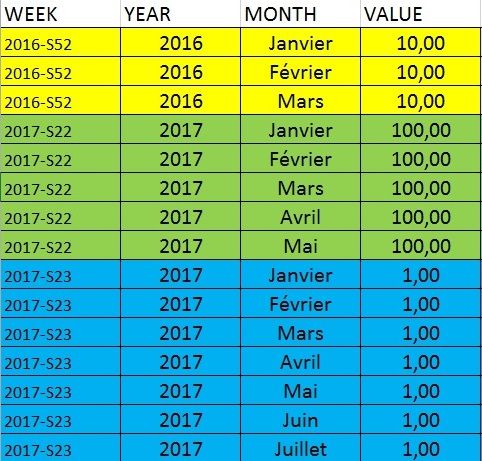
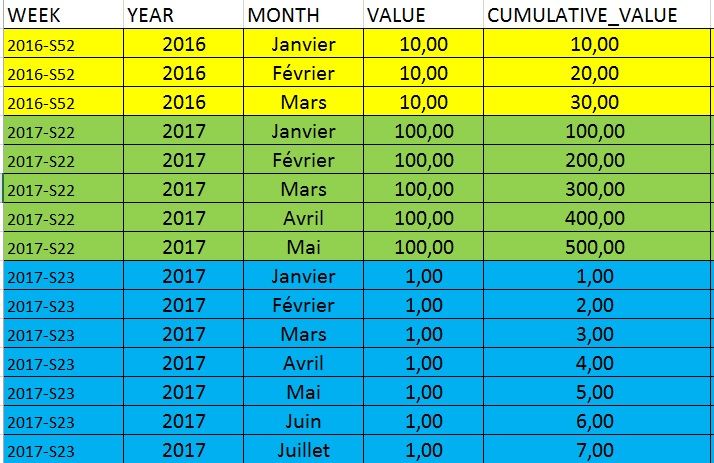
I need your help for a problem. I would like a CUMULATIVE_VALUE in my table. This value is cumulate in fonction of the WEEK and the MONTH.

It's easier to understand with tables :


I have this table :

montab0.jpg


And I would like this table with the new column :

montab1.jpg


Thank a lot for the help !

Joc

2 ACCEPTED SOLUTIONS
Anonymous
Not applicable

Hi @joc,


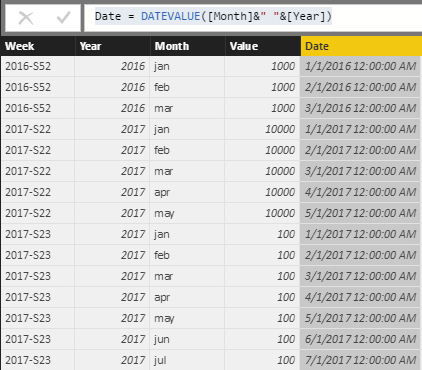
You can use year and month column to create a date column ,then use it as the index to calculate the rolling total.


Sample:

Date = DATEVALUE([Month]&" "&[Year])

6.PNG


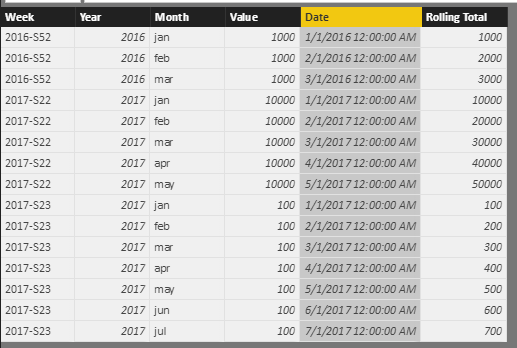
Cumulative values:


Rolling Total = CALCULATE(SUM(Sheet4[Value]),FILTER(ALL(Sheet4),[Year]=EARLIER(Sheet4[Year])&&[Week]=EARLIER(Sheet4[Week])&&[Date]<=EARLIER(Sheet4[Date])))


7.PNG


Regards,

XIaoxin Sheng

View solution in original post

@Anonymous  Perfect ! Thanks !

View solution in original post

5 REPLIES 5
Anonymous
Not applicable

Hi @joc,


You can use year and month column to create a date column ,then use it as the index to calculate the rolling total.


Sample:

Date = DATEVALUE([Month]&" "&[Year])

6.PNG


Cumulative values:


Rolling Total = CALCULATE(SUM(Sheet4[Value]),FILTER(ALL(Sheet4),[Year]=EARLIER(Sheet4[Year])&&[Week]=EARLIER(Sheet4[Week])&&[Date]<=EARLIER(Sheet4[Date])))


7.PNG


Regards,

XIaoxin Sheng

@Anonymous  Perfect ! Thanks !

vanessafvg
Community Champion
Community Champion

@joc to create a cummulative value you will either need an index in your table in the correct sequence or alternatively have a separate date table that links to your table


If I took the time to answer your question and I came up with a solution, please mark my post as a solution and /or give kudos freely for the effort 🙂 Thank you!

Proud to be a Super User!


Thank you @vanessafvg


I add a new row "SORT" where JANUARY=1, FEBRUARY=2... but the résult is not good.


CUMULATIVE_VALUE = 
VAR sort = 'table'[SORT]
RETURN
    CALCULATE (
        SUM ( 'table'[VALUE] );
        FILTER (
            'table';
            'table'[SORT] <= SORT
        )
    )

I don't know how take into account the WEEK !

Thank you for the help,

Joc

vanessafvg
Community Champion
Community Champion


@joc that doesn't sound right each row must have a unique index


If I took the time to answer your question and I came up with a solution, please mark my post as a solution and /or give kudos freely for the effort 🙂 Thank you!

Proud to be a Super User!


Helpful resources

Announcements
Power BI DataViz World Championships

Power BI Dataviz World Championships

The Power BI Data Visualization World Championships is back! Get ahead of the game and start preparing now!

December 2025 Power BI Update Carousel

Power BI Monthly Update - December 2025

Check out the December 2025 Power BI Holiday Recap!

FabCon Atlanta 2026 carousel

FabCon Atlanta 2026

Join us at FabCon Atlanta, March 16-20, for the ultimate Fabric, Power BI, AI and SQL community-led event. Save $200 with code FABCOMM.