cancel
Showing results for 
Search instead for 
Did you mean: 

July 7 - July 17 | Round 2 of the Power BI Dataviz World Championships. Don't miss your chance! Learn more

Reply
joc
Helper I
Helper I

Cumulative values

Hello everybody,


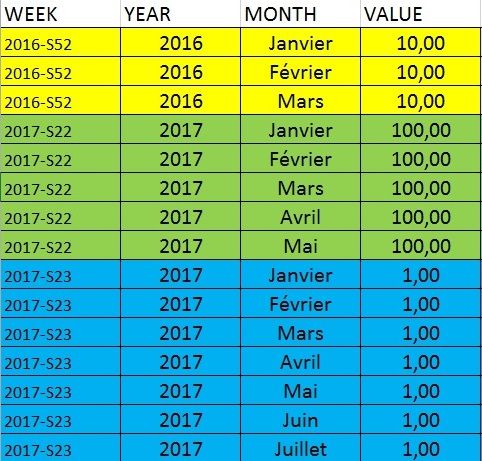
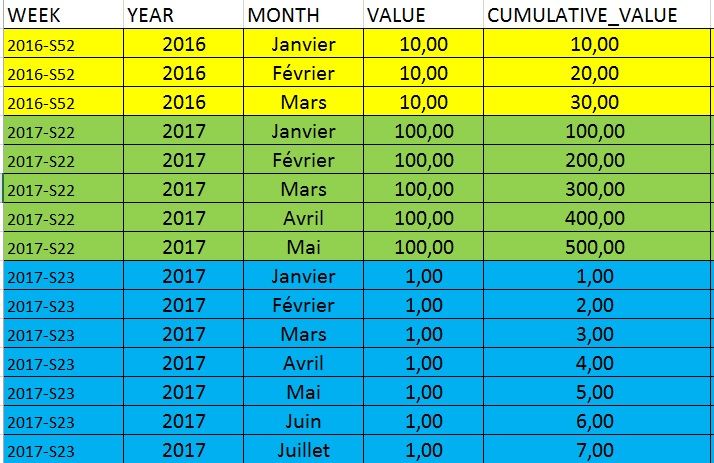
I need your help for a problem. I would like a CUMULATIVE_VALUE in my table. This value is cumulate in fonction of the WEEK and the MONTH.

It's easier to understand with tables :


I have this table :

montab0.jpg


And I would like this table with the new column :

montab1.jpg


Thank a lot for the help !

Joc

2 ACCEPTED SOLUTIONS
Anonymous
Not applicable

Hi @joc,


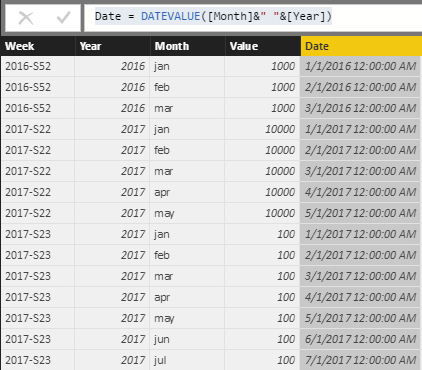
You can use year and month column to create a date column ,then use it as the index to calculate the rolling total.


Sample:

Date = DATEVALUE([Month]&" "&[Year])

6.PNG


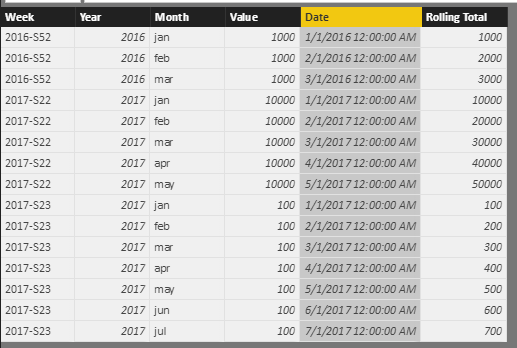
Cumulative values:


Rolling Total = CALCULATE(SUM(Sheet4[Value]),FILTER(ALL(Sheet4),[Year]=EARLIER(Sheet4[Year])&&[Week]=EARLIER(Sheet4[Week])&&[Date]<=EARLIER(Sheet4[Date])))


7.PNG


Regards,

XIaoxin Sheng

View solution in original post

@Anonymous  Perfect ! Thanks !

View solution in original post

5 REPLIES 5
Anonymous
Not applicable

Hi @joc,


You can use year and month column to create a date column ,then use it as the index to calculate the rolling total.


Sample:

Date = DATEVALUE([Month]&" "&[Year])

6.PNG


Cumulative values:


Rolling Total = CALCULATE(SUM(Sheet4[Value]),FILTER(ALL(Sheet4),[Year]=EARLIER(Sheet4[Year])&&[Week]=EARLIER(Sheet4[Week])&&[Date]<=EARLIER(Sheet4[Date])))


7.PNG


Regards,

XIaoxin Sheng

@Anonymous  Perfect ! Thanks !

vanessafvg
Community Champion
Community Champion

@joc to create a cummulative value you will either need an index in your table in the correct sequence or alternatively have a separate date table that links to your table


If I took the time to answer your question and I came up with a solution, please mark my post as a solution and /or give kudos freely for the effort 🙂 Thank you!

Proud to be a Super User!


Thank you @vanessafvg


I add a new row "SORT" where JANUARY=1, FEBRUARY=2... but the résult is not good.


CUMULATIVE_VALUE = 
VAR sort = 'table'[SORT]
RETURN
    CALCULATE (
        SUM ( 'table'[VALUE] );
        FILTER (
            'table';
            'table'[SORT] <= SORT
        )
    )

I don't know how take into account the WEEK !

Thank you for the help,

Joc

vanessafvg
Community Champion
Community Champion


@joc that doesn't sound right each row must have a unique index


If I took the time to answer your question and I came up with a solution, please mark my post as a solution and /or give kudos freely for the effort 🙂 Thank you!

Proud to be a Super User!


Helpful resources

Announcements
FabCon and SQLCon Barcelona 2026

FabCon & SQLCon – Barcelona 2026

Join us in Barcelona for FabCon and SQLCon, the Fabric, Power BI, SQL, and AI community event. Save €200 with code FABCMTY200.

60 days of Data Days Carousel

Data Days 2026

Join Fabric Data Days 2026: 60 days of free live/on-demand sessions, challenges, study groups, and certification opportunities.

Power BI DataViz World Championships carousel

Power BI DataViz World Championships - June 2026

A new Power BI DataViz World Championship is coming this June! Don't miss out on submitting your entry.