Don't miss your chance to take the Fabric Data Engineer (DP-600) exam for FREE! Find out how by watching the DP-600 session on-demand now through April 28th.
Learn moreJoin the FabCon + SQLCon recap series. Up next: Power BI, Real-Time Intelligence, IQ and AI, and Data Factory take center stage. All sessions are available on-demand after the live show. Register now
Hello everybody,
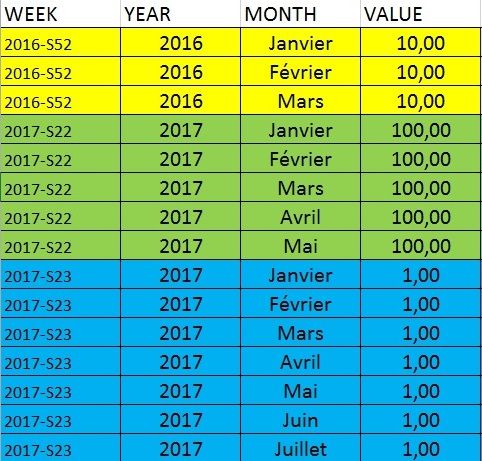
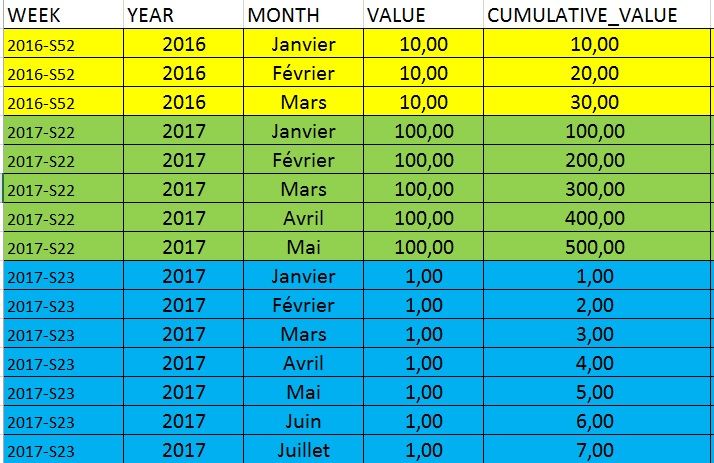
I need your help for a problem. I would like a CUMULATIVE_VALUE in my table. This value is cumulate in fonction of the WEEK and the MONTH.
It's easier to understand with tables :
I have this table :
And I would like this table with the new column :
Thank a lot for the help !
Joc
Solved! Go to Solution.
Hi @joc,
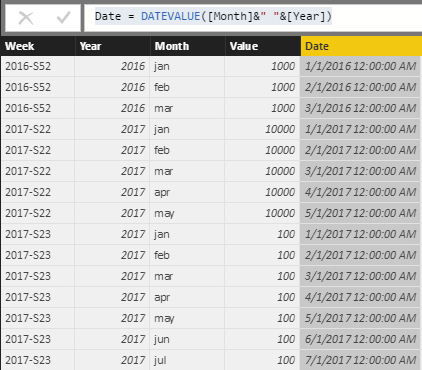
You can use year and month column to create a date column ,then use it as the index to calculate the rolling total.
Sample:
Date = DATEVALUE([Month]&" "&[Year])
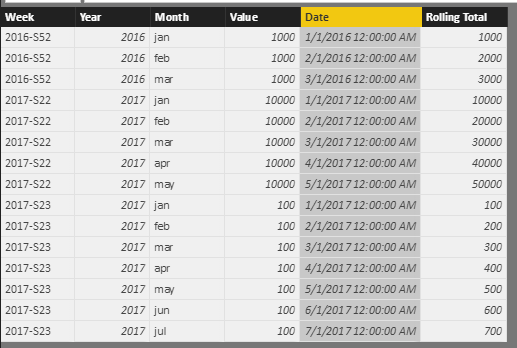
Cumulative values:
Rolling Total = CALCULATE(SUM(Sheet4[Value]),FILTER(ALL(Sheet4),[Year]=EARLIER(Sheet4[Year])&&[Week]=EARLIER(Sheet4[Week])&&[Date]<=EARLIER(Sheet4[Date])))
Regards,
XIaoxin Sheng
Hi @joc,
You can use year and month column to create a date column ,then use it as the index to calculate the rolling total.
Sample:
Date = DATEVALUE([Month]&" "&[Year])
Cumulative values:
Rolling Total = CALCULATE(SUM(Sheet4[Value]),FILTER(ALL(Sheet4),[Year]=EARLIER(Sheet4[Year])&&[Week]=EARLIER(Sheet4[Week])&&[Date]<=EARLIER(Sheet4[Date])))
Regards,
XIaoxin Sheng
@Anonymous Perfect ! Thanks !
@joc to create a cummulative value you will either need an index in your table in the correct sequence or alternatively have a separate date table that links to your table
Proud to be a Super User!
Thank you @vanessafvg.
I add a new row "SORT" where JANUARY=1, FEBRUARY=2... but the résult is not good.
CUMULATIVE_VALUE =
VAR sort = 'table'[SORT]
RETURN
CALCULATE (
SUM ( 'table'[VALUE] );
FILTER (
'table';
'table'[SORT] <= SORT
)
)I don't know how take into account the WEEK !
Thank you for the help,
Joc
@joc that doesn't sound right each row must have a unique index
Proud to be a Super User!
Check out the April 2026 Power BI update to learn about new features.
If you have recently started exploring Fabric, we'd love to hear how it's going. Your feedback can help with product improvements.
A new Power BI DataViz World Championship is coming this June! Don't miss out on submitting your entry.
| User | Count |
|---|---|
| 44 | |
| 38 | |
| 34 | |
| 20 | |
| 16 |
| User | Count |
|---|---|
| 66 | |
| 65 | |
| 30 | |
| 26 | |
| 25 |