cancel
Showing results for 
Search instead for 
Did you mean: 

The Power BI Data Visualization World Championships is back! Get ahead of the game and start preparing now! Learn more

Reply
bice_cold
Frequent Visitor

Cumulative total plot with empty values

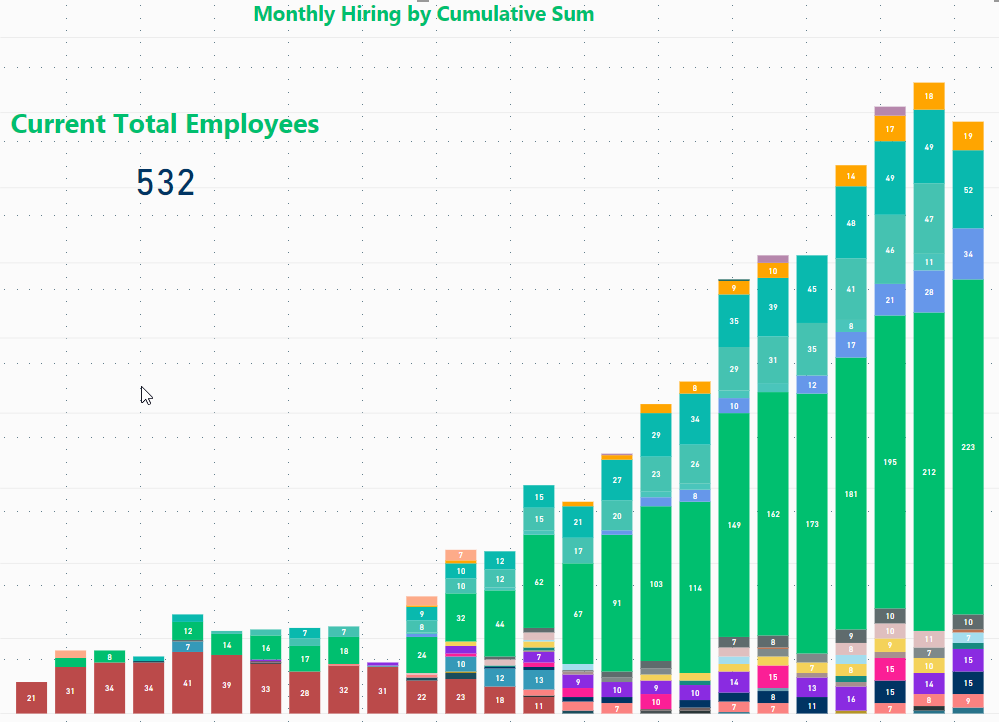
I'm using a measure to create a plot of cumulative total employees at our company by department. It looks like this:
 

EhKVwLQxNv.png


The measure looks like this:


Running Total =

CALCULATE (
SUMX(Employee_Table, Employee_Table[Count]),
    FILTER (
        ALL( 'Employee_Table' ),
        'Employee_Table'[Date] <= MAX( 'Date'[Date] )),
    VALUES(Employee_Table[Department])
)
 
Employee_Table is a table of employee ID#, name, manager, location, hire date, and termination date. On their hire date record they have a count of +1 and on their termination date they have a count of -1. The date table is a calculated table using the min(date) from employee table as the start date and today() as the ending date.
 
This seems to calculate fine, but the problem I run into is that when I plot this all out, if a department doesn't hire in a month the running total doesn't contribute to the given bar. So for example, recruiting is grey in this plot and in the last 4 bars (months) has a value of 9, 10, 0, and 10 because in the second to last month they didn't hire anyone. It should visualize as 9, 10, 10, 10. Also, if this works the stacked column at the very end should have a total of 532, which it does in the tooltip but not the visualization.
 
Thanks for your help!
2 REPLIES 2
Anonymous
Not applicable

Hi all, 


i have the same problem, and no idea how to fix it. 


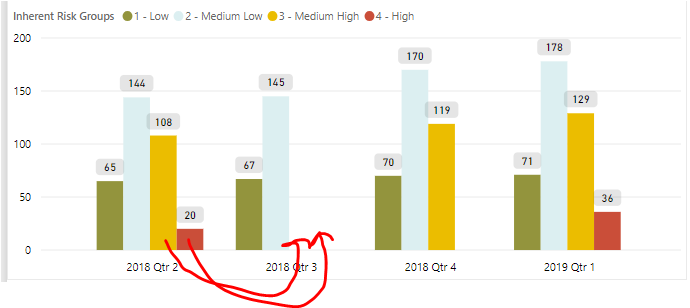
so i have a cumulative bar chart which is working fine and i can not get the bars with no change to show up for the previous quarters. 


any help would be appreciated. 


my cumulative DAX formula read as


Cumulative = CALCULATE(COUNT('History: Risk'[Id]),FILTER(ALL('History: Risk'[CreatedDate].[Date]),'History: Risk'[CreatedDate].[Date] <= MAX('History: Risk'[CreatedDate])))


Capture.PNG

Anonymous
Not applicable

HI @bice_cold,


I think this should related to values function, when specific department not contain in current date range, it will hide rolling cumulative total amount.


Can you please share some sample data for test to coding formula?


Regards,

Xiaoxin Sheng

Helpful resources

Announcements
Power BI DataViz World Championships

Power BI Dataviz World Championships

The Power BI Data Visualization World Championships is back! Get ahead of the game and start preparing now!

December 2025 Power BI Update Carousel

Power BI Monthly Update - December 2025

Check out the December 2025 Power BI Holiday Recap!

FabCon Atlanta 2026 carousel

FabCon Atlanta 2026

Join us at FabCon Atlanta, March 16-20, for the ultimate Fabric, Power BI, AI and SQL community-led event. Save $200 with code FABCOMM.