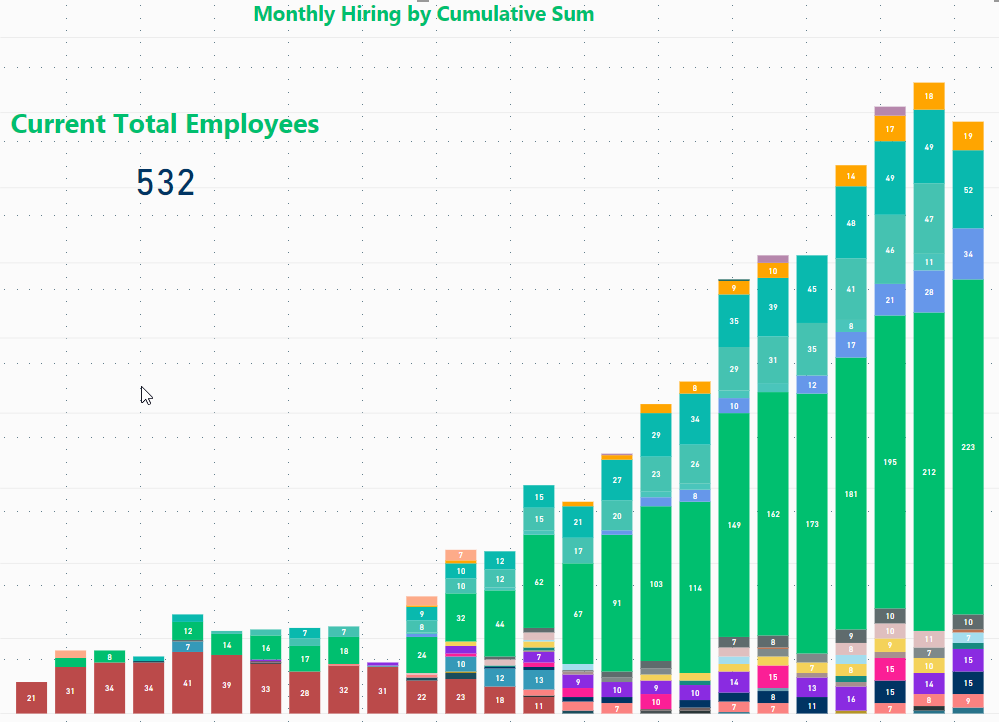
I'm using a measure to create a plot of cumulative total employees at our company by department. It looks like this:
The measure looks like this:
Running Total =
CALCULATE (
SUMX(Employee_Table, Employee_Table[Count]),
FILTER (
ALL( 'Employee_Table' ),
'Employee_Table'[Date] <= MAX( 'Date'[Date] )),
VALUES(Employee_Table[Department])
)
Employee_Table is a table of employee ID#, name, manager, location, hire date, and termination date. On their hire date record they have a count of +1 and on their termination date they have a count of -1. The date table is a calculated table using the min(date) from employee table as the start date and today() as the ending date.
This seems to calculate fine, but the problem I run into is that when I plot this all out, if a department doesn't hire in a month the running total doesn't contribute to the given bar. So for example, recruiting is grey in this plot and in the last 4 bars (months) has a value of 9, 10, 0, and 10 because in the second to last month they didn't hire anyone. It should visualize as 9, 10, 10, 10. Also, if this works the stacked column at the very end should have a total of 532, which it does in the tooltip but not the visualization.
Thanks for your help!