Get Fabric or SQL Certified for Free.
Get certified for free when you join Fabric Data Days 2026 and dive into Fabric, Power BI, SQL, AI, and other essential data skills.
Join now- Power BI forums
- Get Help with Power BI
- Desktop
- Service
- Report Server
- Power Query
- Mobile Apps
- Developer
- DAX Commands and Tips
- Custom Visuals Development Discussion
- Health and Life Sciences
- Power BI Spanish forums
- Translated Spanish Desktop
- Training and Consulting
- Instructor Led Training
- Dashboard in a Day for Women, by Women
- Galleries
- Data Stories Gallery
- Themes Gallery
- Contests Gallery
- QuickViz Gallery
- Quick Measures Gallery
- Visual Calculations Gallery
- Notebook Gallery
- Translytical Task Flow Gallery
- TMDL Gallery
- R Script Showcase
- Webinars and Video Gallery
- Ideas
- Custom Visuals Ideas (read-only)
- Issues
- Issues
- Events
- Upcoming Events
July 7 - July 17 | Round 2 of the Power BI Dataviz World Championships. Don't miss your chance! Learn more
- Power BI forums
- Forums
- Get Help with Power BI
- Desktop
- Re: Cumulative Weekday
- Subscribe to RSS Feed
- Mark Topic as New
- Mark Topic as Read
- Float this Topic for Current User
- Bookmark
- Subscribe
- Printer Friendly Page

- Mark as New
- Bookmark
- Subscribe
- Mute
- Subscribe to RSS Feed
- Permalink
- Report Inappropriate Content
Cumulative Weekday
Dear All,
Could you please share what is the Dax code for the cumulative working day for the following condition below:-
1. First working day of the month assigned as 1, then cumulative adding the weekday (without weekend is considered) during the month (i.e Dec'17 having 21 working days, with 1 to 3 Dec'17= 1, 4 Dec'17 =2, etc., total working days for Dec'17 = 21)
Thanks in advance.

Solved! Go to Solution.


- Mark as New
- Bookmark
- Subscribe
- Mute
- Subscribe to RSS Feed
- Permalink
- Report Inappropriate Content
Hi @tanct,
Try this calculated column formula
=CALCULATE(COUNTROWS('DIM-Calendar'),FILTER('DIM-Calendar','DIM-Calendar'[Date]<=EARLIER('DIM-Calendar'[Date])&&'DIM-Calendar'[Date]>=EARLIER([Date])-DAY(EARLIER([Date]))+1&&'DIM-Calendar'[Weekend]=1))Hope this helps.
Regards,
Ashish Mathur
http://www.ashishmathur.com
https://www.linkedin.com/in/excelenthusiasts/


- Mark as New
- Bookmark
- Subscribe
- Mute
- Subscribe to RSS Feed
- Permalink
- Report Inappropriate Content
You can also try to create a calculated column with following formula.
Cumulative Weekday =
CALCULATE (
    SUM ( 'DIM-Calendar'[Weekend] ),
    FILTER (
        'DIM-Calendar',
        'DIM-Calendar'[Date] <= EARLIER ( 'DIM-Calendar'[Date] )
            && 'DIM-Calendar'[Year] = EARLIER ( 'DIM-Calendar'[Year] )
            && 'DIM-Calendar'[Month] = EARLIER ( 'DIM-Calendar'[Month] )
    )
)
Best Regards,
Herbert
- Mark as New
- Bookmark
- Subscribe
- Mute
- Subscribe to RSS Feed
- Permalink
- Report Inappropriate Content
You can also try to create a calculated column with following formula.
Cumulative Weekday =
CALCULATE (
    SUM ( 'DIM-Calendar'[Weekend] ),
    FILTER (
        'DIM-Calendar',
        'DIM-Calendar'[Date] <= EARLIER ( 'DIM-Calendar'[Date] )
            && 'DIM-Calendar'[Year] = EARLIER ( 'DIM-Calendar'[Year] )
            && 'DIM-Calendar'[Month] = EARLIER ( 'DIM-Calendar'[Month] )
    )
)
Best Regards,
Herbert


- Mark as New
- Bookmark
- Subscribe
- Mute
- Subscribe to RSS Feed
- Permalink
- Report Inappropriate Content
Hi @tanct
Add this calculated column for Cumulative Working Days
=
CALCULATE (
    SUM ( 'Dim-Calendar'[Weekend] ),
    FILTER (
        'Dim-Calendar',
        'Dim-Calendar'[Day] <= EARLIER ( 'Dim-Calendar'[Day] )
            && 'Dim-Calendar'[Month] = EARLIER ( 'Dim-Calendar'[Month] )
    )
)
Regards
Zubair
Please try my custom visuals
- Mark as New
- Bookmark
- Subscribe
- Mute
- Subscribe to RSS Feed
- Permalink
- Report Inappropriate Content
Dear Zubair,
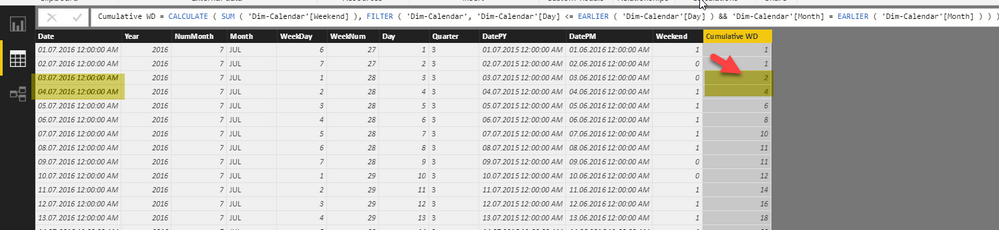
It seems not working.
03.07.2016 should be = 1 and 04.07.2016 = 3 (instead of 2 and 4), the weekend seem unable to adding up correctly.
Thanks for your advice again.
.
- Mark as New
- Bookmark
- Subscribe
- Mute
- Subscribe to RSS Feed
- Permalink
- Report Inappropriate Content
Hi @tanct
Shouldn't 04.07.2016 be = 2 (second working day)
Could you share file via onedrive or google drive?
Give this code a try for the time being
=
CALCULATE (
    SUM ( 'Dim-Calendar'[Weekend] ),
    FILTER (
        'Dim-Calendar',
        'Dim-Calendar'[Day] <= EARLIER ( 'Dim-Calendar'[Day] )
            && 'Dim-Calendar'[Month] = EARLIER ( 'Dim-Calendar'[Month] )
            && 'Dim-Calendar'[Month] = EARLIER ( 'Dim-Calendar'[Month] )
    )
)
Regards
Zubair
Please try my custom visuals
- Mark as New
- Bookmark
- Subscribe
- Mute
- Subscribe to RSS Feed
- Permalink
- Report Inappropriate Content
Hi,
Thanks, please find the below link for the PBIX:-
https://drive.google.com/open?id=1V4bOPU8VHJ8B3C_GE9NQlyKpqEX7Md09
You may go to table DIM Calendar.
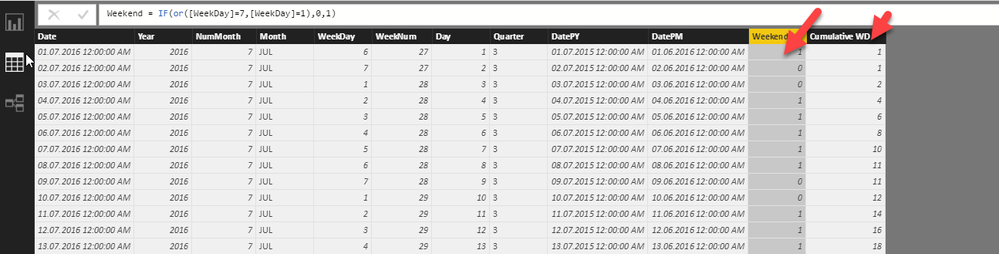
Basically, I have identified the weekend for each of the month (in column Weekend), just pending to sum up the computed weekend figure to arrive working day of the month. Thanks in advance.
- Mark as New
- Bookmark
- Subscribe
- Mute
- Subscribe to RSS Feed
- Permalink
- Report Inappropriate Content
Hi @tanct,
Try this calculated column formula
=CALCULATE(COUNTROWS('DIM-Calendar'),FILTER('DIM-Calendar','DIM-Calendar'[Date]<=EARLIER('DIM-Calendar'[Date])&&'DIM-Calendar'[Date]>=EARLIER([Date])-DAY(EARLIER([Date]))+1&&'DIM-Calendar'[Weekend]=1))Hope this helps.
Regards,
Ashish Mathur
http://www.ashishmathur.com
https://www.linkedin.com/in/excelenthusiasts/

Helpful resources

FabCon & SQLCon – Barcelona 2026
Join us in Barcelona for FabCon and SQLCon, the Fabric, Power BI, SQL, and AI community event. Save €200 with code FABCMTY200.

Data Days 2026
Join Data Days 2026: 60 days of free live/on-demand sessions, challenges, study groups, and certification opportunities.

Power BI DataViz World Championships - June 2026
A new Power BI DataViz World Championship is coming this June! Don't miss out on submitting your entry.

| User | Count |
|---|---|
| 28 | |
| 23 | |
| 18 | |
| 18 | |
| 15 |


| User | Count |
|---|---|
| 47 | |
| 44 | |
| 43 | |
| 38 | |
| 32 |


