Hello,
I am having some issues with the cross-filtering function on my reports.
I have a small table:
| Date | event | user |
| 06/06/2023 | scan | Temp1 |
| 06/06/2023 | print | Temp2 |
| 07/06/2023 | scan | Temp2 |
And a Date Table, generated with the CALENDARAUTO() function. I have also added two columns to this table:
Day of Week = SWITCH(WEEKDAY('Calendar'[Date]),
    1, "Sunday",
    2, "Monday",
    3, "Tuesday",
    4, "Wednesday",
    5, "Thursday",
    6, "Friday",
    7, "Sunday"
)

Date Formatted = LEFT('Calendar'[Day of Week], 3) & UNICHAR(10) & FORMAT('Calendar'[Date], "DD/MM/YY")
So the Date Table is something like:
| Date | Day of Week | Date Formatted |
| 6/06/2023 | Tuesday | Tue 06/06/23 |
| 7/06/2023 | Wednesday | Wed 07/06/2023 |
| ... etc. | | |
The report works fine if I use the date column generated by the CALENDARAUTO() function. But if I try to use Date Formatted in a matrix, then i get the following error message:
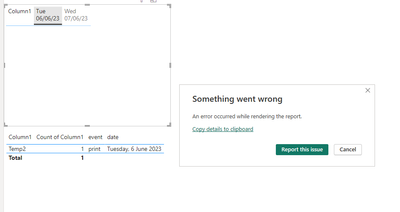
The following is the Error Message:
Feedback Type:
Frown (Error)

Error Message:
An error occurred while rendering the report.

Stack Trace:
Javascript: TypeError
at ElementBuilder.attachEventHandlers (https://ms-pbi.pbi.microsoft.com/minerva/scripts/pivotTableVisuals.js:2760:62)
    at ElementBuilder.attachEventHandlers (https://ms-pbi.pbi.microsoft.com/minerva/scripts/pivotTableVisuals.js:2761:134)
    at ElementBuilder.attachEventHandlers (https://ms-pbi.pbi.microsoft.com/minerva/scripts/pivotTableVisuals.js:2761:134)
    at ElementBuilder.attachEventHandlers (https://ms-pbi.pbi.microsoft.com/minerva/scripts/pivotTableVisuals.js:2761:134)
    at ElementBuilder.attachEventHandlers (https://ms-pbi.pbi.microsoft.com/minerva/scripts/pivotTableVisuals.js:2761:134)
    at ElementBuilder.attachEventHandlers (https://ms-pbi.pbi.microsoft.com/minerva/scripts/pivotTableVisuals.js:2761:134)
    at https://ms-pbi.pbi.microsoft.com/minerva/scripts/pivotTableVisuals.js:2766:44
    at Array.forEach (<anonymous>)
    at ElementBuilder.attachEventHandlersMultiple (https://ms-pbi.pbi.microsoft.com/minerva/scripts/pivotTableVisuals.js:2765:34)
    at TablixRendererFS.insertRowGroup (https://ms-pbi.pbi.microsoft.com/minerva/scripts/pivotTableVisuals.js:3611:51)

Stack Trace Message:
An error occurred while rendering the report.

Invocation Stack Trace:
   at Microsoft.Mashup.Host.Document.ExceptionExtensions.GetCurrentInvocationStackTrace()
   at Microsoft.Mashup.Client.UI.Shared.StackTraceInfo..ctor(String exceptionStackTrace, String invocationStackTrace, String exceptionMessage)
   at Microsoft.PowerBI.Client.Windows.Telemetry.PowerBIUserFeedbackServices.GetStackTraceInfo(Exception e)
   at Microsoft.PowerBI.Client.Windows.Telemetry.PowerBIUserFeedbackServices.ReportException(IWindowHandle activeWindow, IUIHost uiHost, FeedbackPackageInfo feedbackPackageInfo, Exception e, Boolean useGDICapture)
   at Microsoft.Mashup.Client.UI.Shared.UnexpectedExceptionHandler.<>c__DisplayClass14_0.<HandleException>b__0()
   at Microsoft.Mashup.Client.UI.Shared.UnexpectedExceptionHandler.HandleException(Exception e)
   at Microsoft.PowerBI.Client.PowerBIUnexpectedExceptionHandler.HandleException(Exception e)
   at Microsoft.PowerBI.Client.Windows.Utilities.PowerBIFormUnexpectedExceptionHandler.HandleException(Exception e)
   at System.RuntimeMethodHandle.InvokeMethod(Object target, Object[] arguments, Signature sig, Boolean constructor)
   at System.Reflection.RuntimeMethodInfo.UnsafeInvokeInternal(Object obj, Object[] parameters, Object[] arguments)
   at System.Reflection.RuntimeMethodInfo.Invoke(Object obj, BindingFlags invokeAttr, Binder binder, Object[] parameters, CultureInfo culture)
   at Microsoft.PowerBI.Client.Windows.WebView2.WebView2Interop.InvokeCs(InteropCall call)
   at Microsoft.Mashup.Host.Document.ExceptionHandlerExtensions.HandleExceptions(IExceptionHandler exceptionHandler, Action action)
   at System.EventHandler`1.Invoke(Object sender, TEventArgs e)
   at System.Windows.Forms.UnsafeNativeMethods.DispatchMessageW(MSG& msg)
   at System.Windows.Forms.UnsafeNativeMethods.DispatchMessageW(MSG& msg)
   at System.Windows.Forms.Application.ComponentManager.System.Windows.Forms.UnsafeNativeMethods.IMsoComponentManager.FPushMessageLoop(IntPtr dwComponentID, Int32 reason, Int32 pvLoopData)
   at System.Windows.Forms.Application.ThreadContext.RunMessageLoopInner(Int32 reason, ApplicationContext context)
   at System.Windows.Forms.Application.ThreadContext.RunMessageLoop(Int32 reason, ApplicationContext context)
   at System.Windows.Forms.Form.ShowDialog(IWin32Window owner)
   at Microsoft.Mashup.Client.UI.Shared.WindowManager.ShowModal[T](T dialog, Func`1 showModalFunction)
   at Microsoft.PowerBI.Client.Program.<>c__DisplayClass6_0.<RunApplication>b__0()
   at Microsoft.PowerBI.Client.Windows.IExceptionHandlerExtensions.<>c__DisplayClass3_0.<HandleExceptionsWithNestedTasks>b__0()
   at Microsoft.Mashup.Host.Document.ExceptionHandlerExtensions.HandleExceptions(IExceptionHandler exceptionHandler, Action action)
   at Microsoft.PowerBI.Client.Program.RunApplication(String[] args)
   at Microsoft.PowerBI.Client.Program.Main(String[] args)


JS Error Message:
Cannot read properties of undefined (reading 'childNodes')
Has anyone got any clue on what I can do here?


