
Get certified for free when you join Fabric Data Days 2026 and dive into Fabric, Power BI, SQL, AI, and other essential data skills.
Join nowJuly 7 - July 17 | Round 2 of the Power BI Dataviz World Championships. Don't miss your chance! Learn more
Hello all,
I am new to PowerBI and am looking to create an AR Aging bucket. I have pulled all the relevant information from our SQL server, but cannot figure out how to create calculate columns based on the net_due_date field.
We are looking to create 30, 60, 90, and over 90 day aging buckets for reporting that would pull the amount_remaining field to the appropriate buckets based on age.
What would the formulas look like to create these buckets?
Below are the current fields that I have for the table.
Solved! Go to Solution.
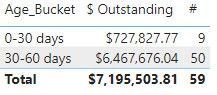
@Anonymous what is your definition for "age"? If it is net_due_date - invoice_date, then a calculated columns something like below might work:
Age_Bucket =
VAR _Age = DATEDIFF('Table'[invoice_date],'Table'[net_due_Date], DAY)
VAR _Result =
SWITCH(
TRUE(),
_Age < 30, "0-30 days",
_Age >= 30 && _Age < 60, "30-60 days",
_Age >= 60 && _Age < 90, "60-90 days",
_Age >= 90, "90+ days"
)
Return
_Result
ebeery, Thanks so much for the Age_Bucket code. It works great!
Hi,
We can use the CALCULATE() and FILTER() functions in a calculated column formula to get your desired result. I can offer more help if you share the link from where i can download your PBI file.
@Anonymous what is your definition for "age"? If it is net_due_date - invoice_date, then a calculated columns something like below might work:
Age_Bucket =
VAR _Age = DATEDIFF('Table'[invoice_date],'Table'[net_due_Date], DAY)
VAR _Result =
SWITCH(
TRUE(),
_Age < 30, "0-30 days",
_Age >= 30 && _Age < 60, "30-60 days",
_Age >= 60 && _Age < 90, "60-90 days",
_Age >= 90, "90+ days"
)
Return
_Result
Join us in Barcelona for FabCon and SQLCon, the Fabric, Power BI, SQL, and AI community event. Save €200 with code FABCMTY200.
Join Fabric Data Days 2026: 60 days of free live/on-demand sessions, challenges, study groups, and certification opportunities.
| User | Count |
|---|---|
| 22 | |
| 22 | |
| 18 | |
| 17 | |
| 13 |
| User | Count |
|---|---|
| 61 | |
| 52 | |
| 47 | |
| 41 | |
| 38 |