
cancel
Showing results for 
Search instead for 
Did you mean: 

Level up your Power BI skills this month - build one visual each week and tell better stories with data! Get started

Reply
Anonymous
Not applicable

Creating an Aging Bucket

Hello all,


I am new to PowerBI and am looking to create an AR Aging bucket. I have pulled all the relevant information from our SQL server, but cannot figure out how to create calculate columns based on the net_due_date field. 


We are looking to create 30, 60, 90, and over 90 day aging buckets for reporting that would pull the amount_remaining field to the appropriate buckets based on age. 


What would the formulas look like to create these buckets? 

Below are the current fields that I have for the table.

Aging Buckets PowerBI.png

1 ACCEPTED SOLUTION
ebeery
Memorable Member
Memorable Member

@Anonymous what is your definition for "age"?  If it is net_due_date - invoice_date, then a calculated columns something like below might work:

Age_Bucket = 
VAR _Age = DATEDIFF('Table'[invoice_date],'Table'[net_due_Date], DAY)
VAR _Result = 
SWITCH(
    TRUE(),
    _Age < 30, "0-30 days",
    _Age >= 30 && _Age < 60, "30-60 days",
    _Age >= 60 && _Age < 90, "60-90 days",
    _Age >= 90, "90+ days"
)
Return
_Result

View solution in original post

3 REPLIES 3
jhauff_RFO
Advocate I
Advocate I

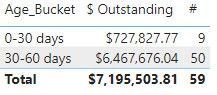
ebeery, Thanks so much for the Age_Bucket code. It works great!


Age Bucket.jpg

Ashish_Mathur
Super User
Super User

Hi,

We can use the CALCULATE() and FILTER() functions in a calculated column formula to get your desired result.  I can offer more help if you share the link from where i can download your PBI file. 


Regards,
Ashish Mathur
http://www.ashishmathur.com
https://www.linkedin.com/in/excelenthusiasts/
ebeery
Memorable Member
Memorable Member

@Anonymous what is your definition for "age"?  If it is net_due_date - invoice_date, then a calculated columns something like below might work:

Age_Bucket = 
VAR _Age = DATEDIFF('Table'[invoice_date],'Table'[net_due_Date], DAY)
VAR _Result = 
SWITCH(
    TRUE(),
    _Age < 30, "0-30 days",
    _Age >= 30 && _Age < 60, "30-60 days",
    _Age >= 60 && _Age < 90, "60-90 days",
    _Age >= 90, "90+ days"
)
Return
_Result

Helpful resources

Announcements
April Power BI Update Carousel

Power BI Monthly Update - April 2026

Check out the April 2026 Power BI update to learn about new features.

Fabric SQL PBI Data Days

Data Days 2026 coming soon!

Sign up to receive a private message when registration opens and key events begin.

New to Fabric survey Carousel

New to Fabric Survey

If you have recently started exploring Fabric, we'd love to hear how it's going. Your feedback can help with product improvements.

Power BI DataViz World Championships carousel

Power BI DataViz World Championships - June 2026

A new Power BI DataViz World Championship is coming this June! Don't miss out on submitting your entry.