This is best Fabric, Power BI, SQL and AI community event. How do we know? The last event sold out! Save €200 with code FABCMTY200.
Register nowJuly 28 - August 9 | Final Round of the Power BI Dataviz World Championships. This is your chance. Learn more
Hi guys,
New to PBI, and in need of some assitance (assuming it's possible).
I need to create an upload file with a fixed format via PowerBI.
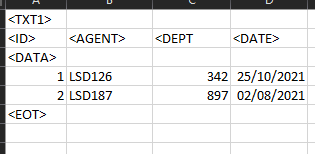
The unstructured format is below:
3 tags, TXT1 which is at the top, below it follows the table columns. Under that then the DATA tag and below it, goes the records in the table. At the very end a closing tag of EOT.
<TXT1>
The columns of a table go here
<DATA>
Table data goes here
<EOT>
Normally I would use SSRS for this, but sadly that is not accessable for me.
Thanks in advance
Regards,
Not sure I understand the format. Are there commas separating the columns and values? It simply a CSV file? Can you post a picture of the file contents from Notepad? Feel free to obfuscate sensitive data as needed.
Proud to be a Super User! | |
it was a excel file. It looks like this. Should of included it apologies.
Ah, we can work with this in Power Query.
Load it using an Excel connector, but delete any and all Applied Steps other than Source and Navigation, stuff like Changed Type and especially Promoted Headers. (Is the data maybe CSV? It will still work.)
Now apply steps in order:
Proud to be a Super User! | |
Join us in Barcelona for FabCon and SQLCon, the Fabric, Power BI, SQL, and AI community event. Save €200 with code FABCMTY200.
If you love stickers, then you will definitely want to check out our community sticker challenge, Barcelona edition!
Check out the July 2026 Power BI update to learn about new features.
| User | Count |
|---|---|
| 25 | |
| 23 | |
| 19 | |
| 17 | |
| 14 |
| User | Count |
|---|---|
| 24 | |
| 20 | |
| 20 | |
| 19 | |
| 19 |