cancel
Showing results for 
Search instead for 
Did you mean: 

Next up in the FabCon + SQLCon recap series: The roadmap for Microsoft SQL and Maximizing Developer experiences in Fabric. All sessions are available on-demand after the live show. Register now

Reply
PBIDF
New Member

Creating a unstructured table

Hi guys,


New to PBI, and in need of some assitance (assuming it's possible).


I need to create an upload file with a fixed format via PowerBI.


The unstructured format is below:


3 tags, TXT1 which is at the top, below it follows the table columns. Under that then the DATA tag and below it, goes the records in the table. At the very end a closing tag of EOT.


<TXT1>
The columns of a table go here
<DATA>
Table data goes here
<EOT>


Normally I would use SSRS for this, but sadly that is not accessable for me.


Thanks in advance


Regards,

3 REPLIES 3
ToddChitt
Super User
Super User

Not sure I understand the format. Are there commas separating the columns and values? It simply a CSV file? Can you post a picture of the file contents from Notepad? Feel free to obfuscate sensitive data as needed.


Did I answer your question? If so, mark my post as a solution. Also consider helping someone else in the forums!

Proud to be a Super User!


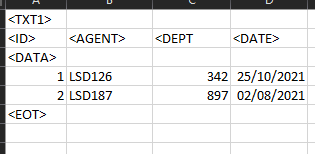
it was a excel file. It looks like this. Should of included it apologies.


PBIDF_0-1660926553660.png


Ah, we can work with this in Power Query. 

Load it using an Excel connector, but delete any and all Applied Steps other than Source and Navigation, stuff like Changed Type and especially Promoted Headers. (Is the data maybe CSV? It will still work.)

Now apply steps in order:

  1. Remove top rows, number to remove: 1
  2. Promote Headers
  3. Filter column <ID> to remove values of <Data> and <EOT>
  4. Change the Data Type of <ID> column to INT.
  5. Rename column headers for readability if you want.


Did I answer your question? If so, mark my post as a solution. Also consider helping someone else in the forums!

Proud to be a Super User!


Helpful resources

Announcements
New to Fabric survey Carousel

New to Fabric Survey

If you have recently started exploring Fabric, we'd love to hear how it's going. Your feedback can help with product improvements.

Power BI DataViz World Championships carousel

Power BI DataViz World Championships - June 2026

A new Power BI DataViz World Championship is coming this June! Don't miss out on submitting your entry.

Join our Fabric User Panel

Join our Fabric User Panel

Share feedback directly with Fabric product managers, participate in targeted research studies and influence the Fabric roadmap.

March Power BI Update Carousel

Power BI Community Update - March 2026

Check out the March 2026 Power BI update to learn about new features.