Don't miss your chance to take the Fabric Data Engineer (DP-600) exam for FREE! Find out how by watching the DP-600 session on-demand now through April 28th.
Learn moreJoin the FabCon + SQLCon recap series. Up next: Power BI, Real-Time Intelligence, IQ and AI, and Data Factory take center stage. All sessions are available on-demand after the live show. Register now
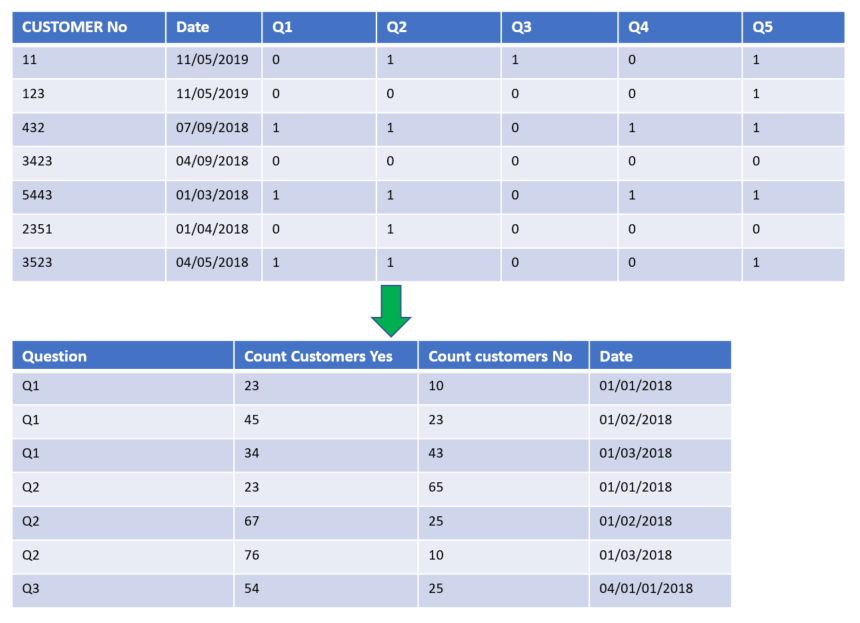
I have some survey data I want to aggregate as in the image below.
Essentially, I want a column with a sum of all customers, grouped by the question and the date. I have a table where all these questions are separate columns and indicated as '0' for no and '1' for yes.
This will mean that I can greate graphs that use 'Question' as an axis, and count of customer as a value.
Normally, I would do this in the EDW layer, but I don't have permissions to do this at the moment, so I'm doing it at the PBI level.
I've seen a number of posts on Summarise table, but I'm finding it difficult to understand how to apply it to my situation where I have multiple binary columns.
Solved! Go to Solution.
Hi @Anonymous,
The suggestion of Ashish_Mathur is meaningful, but need a little change by my test.
1. As Ashish_Mathur suggested, please unpivot the column Q1 to Q5.
2. Create the measure with the formula below.
Yes responses =
CALCULATE (
COUNTROWS ( 'Data' ),
ALLEXCEPT ( Data, 'Data'[Date] ),
FILTER ( 'Data', 'Data'[Value] = 1 )
)
No responses =
CALCULATE (
COUNTROWS ( 'Data' ),
ALLEXCEPT ( Data, 'Data'[Date] ),
FILTER ( 'Data', 'Data'[Value] = 0 )
)
Here is the output.
Best Regards,
Cherry
Hi @Anonymous,
The suggestion of Ashish_Mathur is meaningful, but need a little change by my test.
1. As Ashish_Mathur suggested, please unpivot the column Q1 to Q5.
2. Create the measure with the formula below.
Yes responses =
CALCULATE (
COUNTROWS ( 'Data' ),
ALLEXCEPT ( Data, 'Data'[Date] ),
FILTER ( 'Data', 'Data'[Value] = 1 )
)
No responses =
CALCULATE (
COUNTROWS ( 'Data' ),
ALLEXCEPT ( Data, 'Data'[Date] ),
FILTER ( 'Data', 'Data'[Value] = 0 )
)
Here is the output.
Best Regards,
Cherry
Hi,
In the Query Editor, right click on the first 2 columns and select "Unpivot other columns". Rename the Attribute columns as Question. In a Table visual, drag the Question and Date columns. Write these measures
Yes responses = CALCULATE(DISTINCTCOUNT(Data[Customer No]),Data[Question]="Yes")
No responses = CALCULATE(DISTINCTCOUNT(Data[Customer No]),Data[Question]="No")
Hope this helps.
Check out the April 2026 Power BI update to learn about new features.
If you have recently started exploring Fabric, we'd love to hear how it's going. Your feedback can help with product improvements.
A new Power BI DataViz World Championship is coming this June! Don't miss out on submitting your entry.
| User | Count |
|---|---|
| 41 | |
| 37 | |
| 34 | |
| 21 | |
| 16 |
| User | Count |
|---|---|
| 64 | |
| 58 | |
| 31 | |
| 25 | |
| 25 |