Join us at FabCon Atlanta from March 16 - 20, 2026, for the ultimate Fabric, Power BI, AI and SQL community-led event. Save $200 with code FABCOMM.
Register now!The Power BI Data Visualization World Championships is back! Get ahead of the game and start preparing now! Learn more
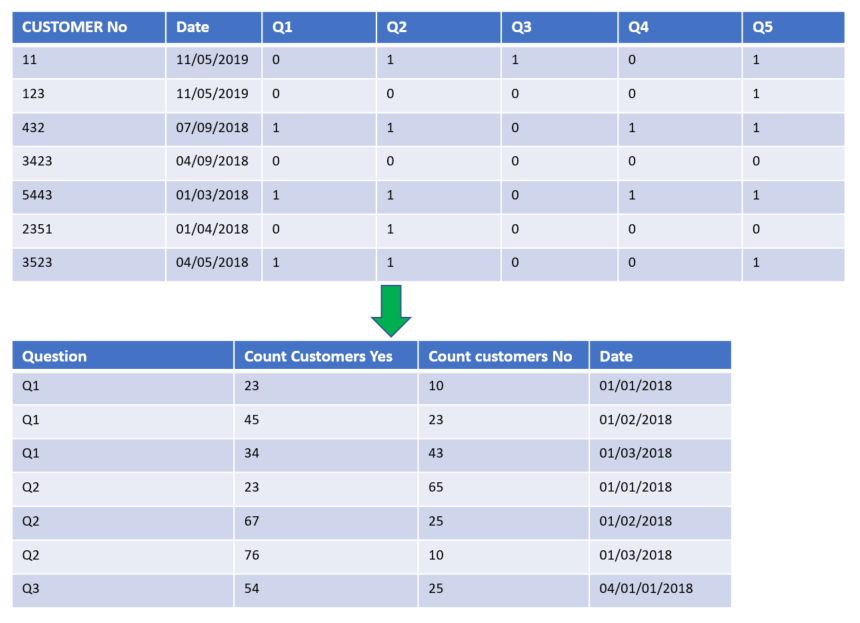
I have some survey data I want to aggregate as in the image below.
Essentially, I want a column with a sum of all customers, grouped by the question and the date. I have a table where all these questions are separate columns and indicated as '0' for no and '1' for yes.
This will mean that I can greate graphs that use 'Question' as an axis, and count of customer as a value.
Normally, I would do this in the EDW layer, but I don't have permissions to do this at the moment, so I'm doing it at the PBI level.
I've seen a number of posts on Summarise table, but I'm finding it difficult to understand how to apply it to my situation where I have multiple binary columns.
Solved! Go to Solution.
Hi @Anonymous,
The suggestion of Ashish_Mathur is meaningful, but need a little change by my test.
1. As Ashish_Mathur suggested, please unpivot the column Q1 to Q5.
2. Create the measure with the formula below.
Yes responses =
CALCULATE (
COUNTROWS ( 'Data' ),
ALLEXCEPT ( Data, 'Data'[Date] ),
FILTER ( 'Data', 'Data'[Value] = 1 )
)
No responses =
CALCULATE (
COUNTROWS ( 'Data' ),
ALLEXCEPT ( Data, 'Data'[Date] ),
FILTER ( 'Data', 'Data'[Value] = 0 )
)
Here is the output.
Best Regards,
Cherry
Hi @Anonymous,
The suggestion of Ashish_Mathur is meaningful, but need a little change by my test.
1. As Ashish_Mathur suggested, please unpivot the column Q1 to Q5.
2. Create the measure with the formula below.
Yes responses =
CALCULATE (
COUNTROWS ( 'Data' ),
ALLEXCEPT ( Data, 'Data'[Date] ),
FILTER ( 'Data', 'Data'[Value] = 1 )
)
No responses =
CALCULATE (
COUNTROWS ( 'Data' ),
ALLEXCEPT ( Data, 'Data'[Date] ),
FILTER ( 'Data', 'Data'[Value] = 0 )
)
Here is the output.
Best Regards,
Cherry
Hi,
In the Query Editor, right click on the first 2 columns and select "Unpivot other columns". Rename the Attribute columns as Question. In a Table visual, drag the Question and Date columns. Write these measures
Yes responses = CALCULATE(DISTINCTCOUNT(Data[Customer No]),Data[Question]="Yes")
No responses = CALCULATE(DISTINCTCOUNT(Data[Customer No]),Data[Question]="No")
Hope this helps.
The Power BI Data Visualization World Championships is back! Get ahead of the game and start preparing now!
| User | Count |
|---|---|
| 64 | |
| 47 | |
| 41 | |
| 36 | |
| 23 |
| User | Count |
|---|---|
| 185 | |
| 123 | |
| 106 | |
| 78 | |
| 52 |