cancel
Showing results for 
Search instead for 
Did you mean: 

Try your skills in the Power BI Dataviz World Championship! Round one ends June 26. Join now

Reply
Anonymous
Not applicable

Creating a new summary table with multiple binary columns

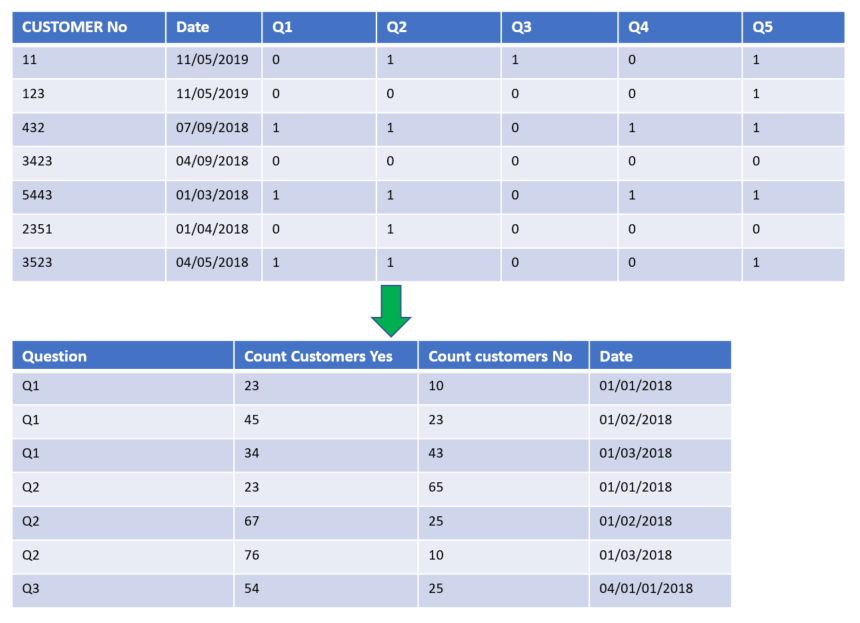
I have some survey data I want to aggregate as in the image below.


Essentially, I want a column with a sum of all customers, grouped by the question and the date. I have a table where all these questions are separate columns and indicated as '0' for no and '1' for yes.


This will mean that I can greate graphs that use 'Question' as an axis, and count of customer as a value.


Normally, I would do this in the EDW layer, but I don't have permissions to do this at the moment, so I'm doing it at the PBI level.


I've seen a number of posts on Summarise table, but I'm finding it difficult to understand how to apply it to my situation where I have multiple binary columns.


sampleCustcount.PNG

1 ACCEPTED SOLUTION
v-piga-msft
Resident Rockstar
Resident Rockstar

Hi @Anonymous,


The suggestion of Ashish_Mathur is meaningful, but need a little change by my test.


1. As Ashish_Mathur suggested, please unpivot the column Q1 to Q5.

2. Create the measure with the formula below.


Yes responses =
CALCULATE (
    COUNTROWS ( 'Data' ),
    ALLEXCEPT ( Data, 'Data'[Date] ),
    FILTER ( 'Data', 'Data'[Value] = 1 )
)

No responses =
CALCULATE (
    COUNTROWS ( 'Data' ),
    ALLEXCEPT ( Data, 'Data'[Date] ),
    FILTER ( 'Data', 'Data'[Value] = 0 )
)

Here is the output.


Capture.PNG


Best Regards,

Cherry

Community Support Team _ Cherry Gao
If this post helps, then please consider Accept it as the solution to help the other members find it more quickly.

View solution in original post

2 REPLIES 2
v-piga-msft
Resident Rockstar
Resident Rockstar

Hi @Anonymous,


The suggestion of Ashish_Mathur is meaningful, but need a little change by my test.


1. As Ashish_Mathur suggested, please unpivot the column Q1 to Q5.

2. Create the measure with the formula below.


Yes responses =
CALCULATE (
    COUNTROWS ( 'Data' ),
    ALLEXCEPT ( Data, 'Data'[Date] ),
    FILTER ( 'Data', 'Data'[Value] = 1 )
)

No responses =
CALCULATE (
    COUNTROWS ( 'Data' ),
    ALLEXCEPT ( Data, 'Data'[Date] ),
    FILTER ( 'Data', 'Data'[Value] = 0 )
)

Here is the output.


Capture.PNG


Best Regards,

Cherry

Community Support Team _ Cherry Gao
If this post helps, then please consider Accept it as the solution to help the other members find it more quickly.
Ashish_Mathur
Super User
Super User

Hi,


In the Query Editor, right click on the first 2 columns and select "Unpivot other columns".  Rename the Attribute columns as Question.  In a Table visual, drag the Question and Date columns.  Write these measures


Yes responses = CALCULATE(DISTINCTCOUNT(Data[Customer No]),Data[Question]="Yes")

No responses = CALCULATE(DISTINCTCOUNT(Data[Customer No]),Data[Question]="No")


Hope this helps.


Regards,
Ashish Mathur
http://www.ashishmathur.com
https://www.linkedin.com/in/excelenthusiasts/

Helpful resources

Announcements
Fabric Data Days is here Carousel

Data Days 2026

Don't miss out on Data Days, June 15 through August 7. Learn Fabric, Power BI, SQL, AI and more.

Power BI DataViz World Championships carousel

Power BI DataViz World Championships - June 2026

A new Power BI DataViz World Championship is coming this June! Don't miss out on submitting your entry.