cancel
Showing results for 
Search instead for 
Did you mean: 

July 28 - August 9 | Final Round of the Power BI Dataviz World Championships. This is your chance. Learn more

Reply
sieed
Helper II
Helper II

Creating a custom date range

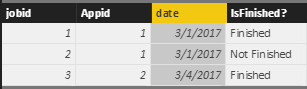
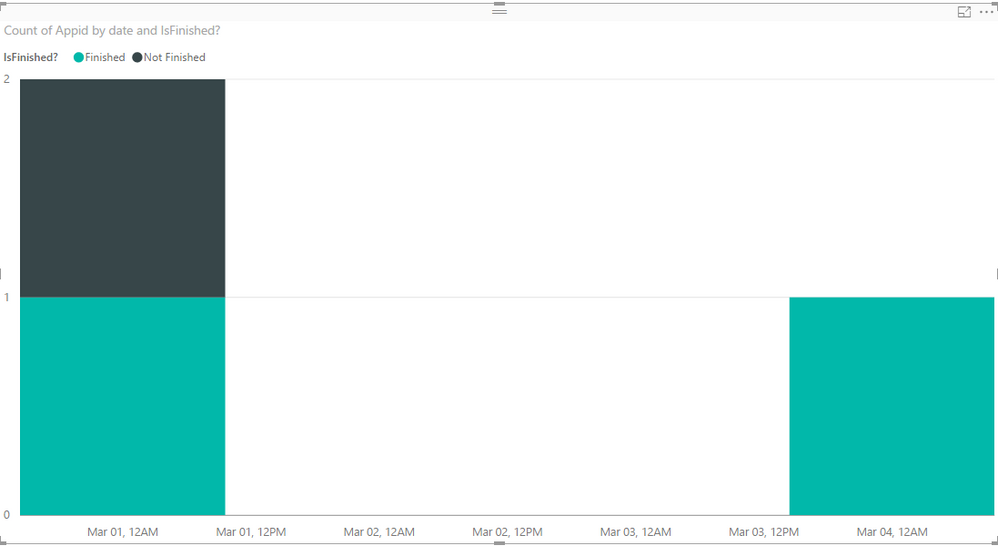
I have two tables namely App and Job. I am creating a graph that shows whether the job was finished/unfinished. 

jobtable.PNGjobgrah.PNG

I would like to display the x-axis such that it shows the last fifteen days. I can't use the filter functionality of power bi since I would have to change the current date everyday. How can I make it to where it updates itself ? Any ideas? 

Update: Here's what I have done so far but it's still not giving me what I want. I have created a calculated column: 


LastFifteen = TODAY() - date.  Doing this diaplays only the dates that the in the table.  For instance, I do not have a record on 24th of Feb, but I would still like to display 24th of Feb on my x-axis because it falls in the last 15 days range. How can I do that? 

1 ACCEPTED SOLUTION

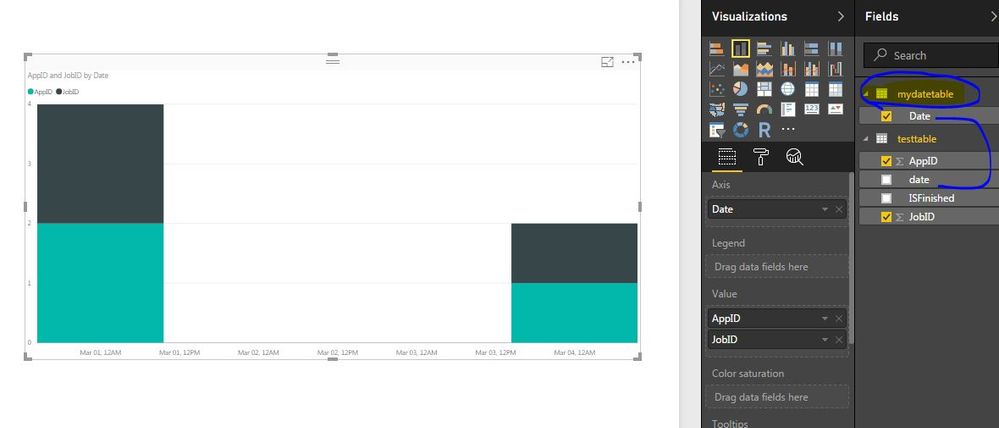
I created a custom table with the help of calender function, then I created relation with date column from custom table to original table date column.

cCapture.JPG


View solution in original post

4 REPLIES 4
rocky09
Solution Sage
Solution Sage

@sieed


May be you can create a custom table like below and make relation with date column.


mydatetable = CALENDAR(TODAY()-15,TODAY())

I would appreciate if you can provide an example. I am still confused. Please see my updated post. 

Hi @sieed,


Have your tried the solution provided by rocky09? I just verified that it should work in your scenario.Smiley Happy


1. Use the formula below to create an individual Calendar table.

Calendar = CALENDAR(TODAY()-15,TODAY())

2. Create a relationship between your Job table and the created Calendar table with the date column.


3. Use the date column from Calendar table as the Axis for the Chart on report.


Regards

I created a custom table with the help of calender function, then I created relation with date column from custom table to original table date column.

cCapture.JPG


Helpful resources

Announcements
FabCon and SQLCon Barcelona 2026

FabCon & SQLCon – Barcelona 2026

Join us in Barcelona for FabCon and SQLCon, the Fabric, Power BI, SQL, and AI community event. Save €200 with code FABCMTY200.

Fabric Community Sticker Design Challenge Barcelona Carousel

Fabric Community Sticker Challenge - Barcelona 2026

If you love stickers, then you will definitely want to check out our community sticker challenge, Barcelona edition!

July Power BI Update Carousel

Power BI Monthly Update - July 2026

Check out the July 2026 Power BI update to learn about new features.

Power BI DataViz World Championships carousel

Power BI DataViz World Championships - June 2026

A new Power BI DataViz World Championship is coming this June! Don't miss out on submitting your entry.