Don't miss your chance to take the Fabric Data Engineer (DP-700) exam on us!
Learn moreNext up in the FabCon + SQLCon recap series: The roadmap for Microsoft SQL and Maximizing Developer experiences in Fabric. All sessions are available on-demand after the live show. Register now
I am looking at subcriptions and I want to see how many active subscriptions we have.
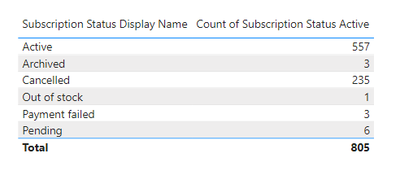
In my column we have the following
What I need to do is create a measure which deducts all of the display names except 'Active' from 'Active' what sort of formula could I use?
Thanks!
Solved! Go to Solution.
Hi @Anonymous ,
There are two ways to get the data you want. You can refer to either of the two .
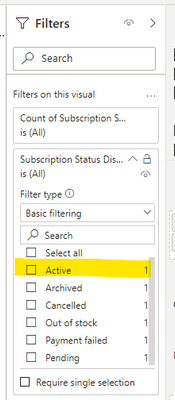
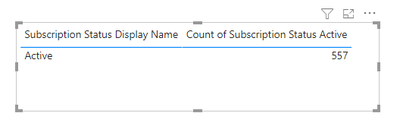
(1)A simpler way is setting in Visual filter .You can select ‘Active’ and the return value is what you want .
(2)Create a measure like:
active = CALCULATE(SELECTEDVALUE('Table'[Count of Subscription Status Active]),FILTER('Table','Table'[Subscription Status Display Name]="Active"))
And add a card to display the return value .
Best Regards
Community Support Team _ Ailsa Tao
If this post helps, then please consider Accept it as the solution to help the other members find it more quickly.
Hi @Anonymous ,
There are two ways to get the data you want. You can refer to either of the two .
(1)A simpler way is setting in Visual filter .You can select ‘Active’ and the return value is what you want .
(2)Create a measure like:
active = CALCULATE(SELECTEDVALUE('Table'[Count of Subscription Status Active]),FILTER('Table','Table'[Subscription Status Display Name]="Active"))
And add a card to display the return value .
Best Regards
Community Support Team _ Ailsa Tao
If this post helps, then please consider Accept it as the solution to help the other members find it more quickly.
@Anonymous
is your Subscription status display Name column or measure?
if it is a column then a simple filter will do your job
Calculate([ count of subscription status active],Subscription status display Name ="Active")
Regards
Sanalytics
It's a column! 🙂
With the calculate function how would I filter for one result and then deduct all the others?
e.g. 'Active' - (Archived + Cancelled + Out of stock + Payment Failed + Pending)?
Hi @Anonymous
Have you tried applying a filter on that visual from the filter tab?
Did it work ? Mark it as a solution to help spreading knowledge.
A kudos would be appreciated
If you have recently started exploring Fabric, we'd love to hear how it's going. Your feedback can help with product improvements.
A new Power BI DataViz World Championship is coming this June! Don't miss out on submitting your entry.
Share feedback directly with Fabric product managers, participate in targeted research studies and influence the Fabric roadmap.
| User | Count |
|---|---|
| 48 | |
| 45 | |
| 41 | |
| 20 | |
| 18 |
| User | Count |
|---|---|
| 68 | |
| 67 | |
| 33 | |
| 31 | |
| 29 |