Don't miss your chance to take the Fabric Data Engineer (DP-600) exam for FREE! Find out how by attending the DP-600 session on April 23rd (pacific time), live or on-demand.
Learn moreNext up in the FabCon + SQLCon recap series: The roadmap for Microsoft SQL and Maximizing Developer experiences in Fabric. All sessions are available on-demand after the live show. Register now
I am looking at subcriptions and I want to see how many active subscriptions we have.
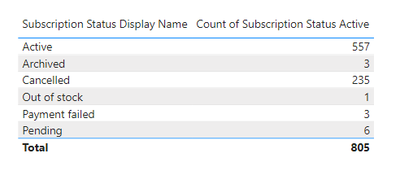
In my column we have the following
What I need to do is create a measure which deducts all of the display names except 'Active' from 'Active' what sort of formula could I use?
Thanks!
Solved! Go to Solution.
Hi @Anonymous ,
There are two ways to get the data you want. You can refer to either of the two .
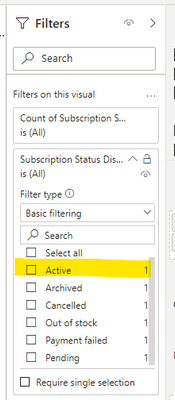
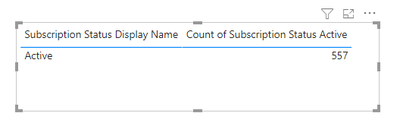
(1)A simpler way is setting in Visual filter .You can select ‘Active’ and the return value is what you want .
(2)Create a measure like:
active = CALCULATE(SELECTEDVALUE('Table'[Count of Subscription Status Active]),FILTER('Table','Table'[Subscription Status Display Name]="Active"))
And add a card to display the return value .
Best Regards
Community Support Team _ Ailsa Tao
If this post helps, then please consider Accept it as the solution to help the other members find it more quickly.
Hi @Anonymous ,
There are two ways to get the data you want. You can refer to either of the two .
(1)A simpler way is setting in Visual filter .You can select ‘Active’ and the return value is what you want .
(2)Create a measure like:
active = CALCULATE(SELECTEDVALUE('Table'[Count of Subscription Status Active]),FILTER('Table','Table'[Subscription Status Display Name]="Active"))
And add a card to display the return value .
Best Regards
Community Support Team _ Ailsa Tao
If this post helps, then please consider Accept it as the solution to help the other members find it more quickly.
@Anonymous
is your Subscription status display Name column or measure?
if it is a column then a simple filter will do your job
Calculate([ count of subscription status active],Subscription status display Name ="Active")
Regards
Sanalytics
It's a column! 🙂
With the calculate function how would I filter for one result and then deduct all the others?
e.g. 'Active' - (Archived + Cancelled + Out of stock + Payment Failed + Pending)?
Hi @Anonymous
Have you tried applying a filter on that visual from the filter tab?
Did it work ? Mark it as a solution to help spreading knowledge.
A kudos would be appreciated
If you have recently started exploring Fabric, we'd love to hear how it's going. Your feedback can help with product improvements.
A new Power BI DataViz World Championship is coming this June! Don't miss out on submitting your entry.
| User | Count |
|---|---|
| 46 | |
| 43 | |
| 39 | |
| 19 | |
| 15 |
| User | Count |
|---|---|
| 68 | |
| 67 | |
| 31 | |
| 27 | |
| 24 |