cancel
Showing results for 
Search instead for 
Did you mean: 

We've captured the moments from FabCon & SQLCon that everyone is talking about, and we are bringing them to the community, live and on-demand. Starts on April 14th. Register now

Reply
patri0t82
Post Patron
Post Patron

Creating a Measure - RIF based on Injury Counts and Hours

Hello, there is a metric in the world of industry called RIF (Recordable Injury Frequency), which is the count of injuries * 200,000 divided by the sum of workforce hours for the same particular period.


I would like to create a measure that (based on selections), will calculate the RIF.


I have two tables in the attached file. 'Recordable' and 'Hours'. I would like to be able to find the RIF for any particular operating area based on injuries that include "Lost Time", "Medical Aid", "Modified Duty" and "Fatality".


As a side request, I will also be attempting to combine some companies (for example, Group1 and Group2 will be called TeamA) and I would like to find their RIF as well.


Any help with this would be most appreciated.


https://drive.google.com/file/d/149AdW0is2UngroFM0kfXpFQ2wznEf4sJ/view?usp=sharing 

1 ACCEPTED SOLUTION
Anonymous
Not applicable

HI @patri0t82,

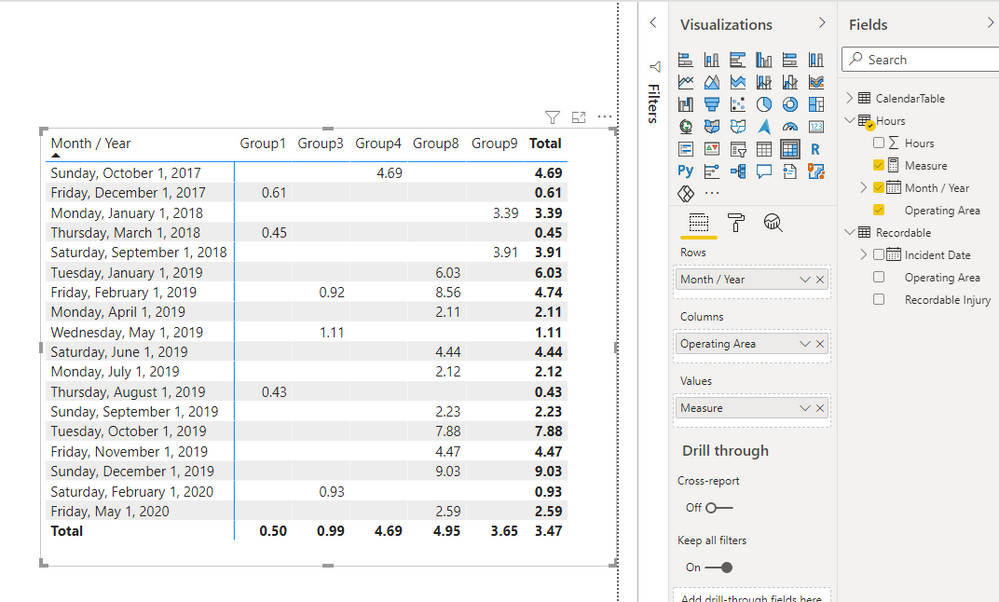
You can try to use the following measure expression if it meets your requirement:


Measure = 
VAR summary =
    SUMMARIZE (
        Hours,
        [Month / Year],
        [Operating Area],
        "workhour", SUM ( Hours[Hours] ),
        "injury",
            CALCULATE (
                COUNT ( Recordable[Recordable Injury] ),
                FILTER (
                    ALLSELECTED ( Recordable ),
                    Recordable[Recordable Injury] <> ""
                        && Recordable[Incident Date] = EARLIER ( Hours[Month / Year] )
                        && Recordable[Operating Area] = EARLIER ( Hours[Operating Area] )
                )
            )
    )
RETURN
    AVERAGEX ( summary, DIVIDE ( [injury] * 200000, [workhour] ) )


4.png

Regards,

Xiaoxin Sheng

View solution in original post

2 REPLIES 2
Anonymous
Not applicable

HI @patri0t82,

You can try to use the following measure expression if it meets your requirement:


Measure = 
VAR summary =
    SUMMARIZE (
        Hours,
        [Month / Year],
        [Operating Area],
        "workhour", SUM ( Hours[Hours] ),
        "injury",
            CALCULATE (
                COUNT ( Recordable[Recordable Injury] ),
                FILTER (
                    ALLSELECTED ( Recordable ),
                    Recordable[Recordable Injury] <> ""
                        && Recordable[Incident Date] = EARLIER ( Hours[Month / Year] )
                        && Recordable[Operating Area] = EARLIER ( Hours[Operating Area] )
                )
            )
    )
RETURN
    AVERAGEX ( summary, DIVIDE ( [injury] * 200000, [workhour] ) )


4.png

Regards,

Xiaoxin Sheng

I'm so sorry I didn't get back to you sooner. Thank you very much for the solution, it's accomplishing what I hoped it would.

Helpful resources

Announcements
New to Fabric survey Carousel

New to Fabric Survey

If you have recently started exploring Fabric, we'd love to hear how it's going. Your feedback can help with product improvements.

Power BI DataViz World Championships carousel

Power BI DataViz World Championships - June 2026

A new Power BI DataViz World Championship is coming this June! Don't miss out on submitting your entry.

Join our Fabric User Panel

Join our Fabric User Panel

Share feedback directly with Fabric product managers, participate in targeted research studies and influence the Fabric roadmap.

March Power BI Update Carousel

Power BI Community Update - March 2026

Check out the March 2026 Power BI update to learn about new features.