Share feedback directly with Fabric product managers, participate in targeted research studies and influence the Fabric roadmap.
Sign up nowGet Fabric certified for FREE! Don't miss your chance! Learn more
Hi everyone,
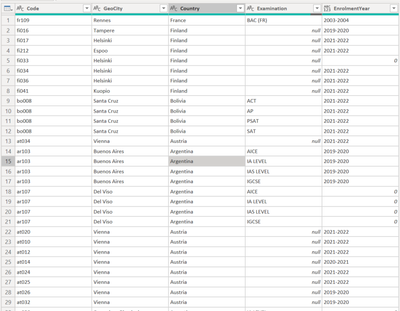
I am still pretty new in Power BI but I am having trouble creating a matrix visualization based on this table:
The idea should look like this
I was able to extract the years however I cannot add the count of codes for the columns. Can you help me figure out the possible solution for this?
Solved! Go to Solution.
In the "Rows" box drag the "Geocity" field
In the "Columns" box put the "EnrolementYear" field
In the "Values" box put the "Code" BUT then right click on it and choose "Count".
Apologies if that's what you've already tried. If so, perhaps you could explain a little more or provide some sample data.
In the "Rows" box drag the "Geocity" field
In the "Columns" box put the "EnrolementYear" field
In the "Values" box put the "Code" BUT then right click on it and choose "Count".
Apologies if that's what you've already tried. If so, perhaps you could explain a little more or provide some sample data.
Hi @PijushRoy
Here's the sample data
CodeGeoCityEnrolmentYear
| fr109 | Rennes | 2003-2004 |
| fi016 | Tampere | 2019-2020 |
| fi017 | Helsinki | 2021-2022 |
| fi212 | Espoo | 2021-2022 |
| fi033 | Helsinki | 0 |
| fi034 | Helsinki | 2021-2022 |
| fi036 | Helsinki | 2021-2022 |
| fi041 | Kuopio | 2021-2022 |
| bo008 | Santa Cruz | 2021-2022 |
| bo008 | Santa Cruz | 2021-2022 |
| bo008 | Santa Cruz | 2021-2022 |
| bo008 | Santa Cruz | 2021-2022 |
| at034 | Vienna | 2021-2022 |
| ar103 | Buenos Aires | 2019-2020 |
| ar103 | Buenos Aires | 2019-2020 |
| ar103 | Buenos Aires | 2019-2020 |
| ar103 | Buenos Aires | 2019-2020 |
If you want to display the number of codes by city and year you can do this:
Add the year field to the Columns and the city field in the Rows. Then in the Values you can add DAX measure like this:
Count_of_code = COUNTROWS(Code)
Please share (copy and paste) sample data
Proud to be a Super User! | |
If you love stickers, then you will definitely want to check out our Community Sticker Challenge!
Check out the January 2026 Power BI update to learn about new features.
| User | Count |
|---|---|
| 62 | |
| 58 | |
| 45 | |
| 21 | |
| 18 |
| User | Count |
|---|---|
| 119 | |
| 116 | |
| 37 | |
| 34 | |
| 30 |