Join us at FabCon Atlanta from March 16 - 20, 2026, for the ultimate Fabric, Power BI, AI and SQL community-led event. Save $200 with code FABCOMM.
Register now!The Power BI Data Visualization World Championships is back! Get ahead of the game and start preparing now! Learn more
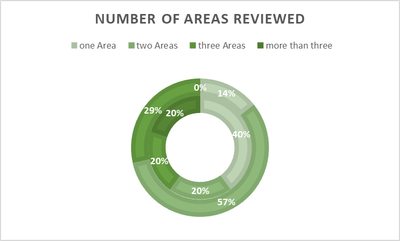
I like to create a smiple sunburts in PowerBI like it is possible in xls:
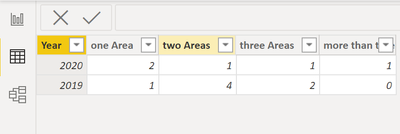
| 2020 | 2019 | |
| one Area | 2 | 1 |
| two Areas | 1 | 4 |
| three Areas | 1 | 2 |
| more than three | 1 | 0 |
| total n | 5 | 7 |
I inserted the above data in Power BI like this
I imported the Sunburst by MAQ Software, but have problems in understanding how to create this with the above data:
Is it possible to create the same chart like with xls?
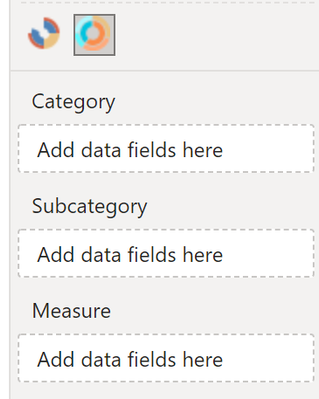
I don't understand how I need to change the data input above and what the measure is going to be?
Solved! Go to Solution.
@acg You need to unpivot your raw data first.
In Power Query (click Transform Data in the Home tab in Power BI to open Power Query), select the 'Year' column and in the Transform tab click 'Unpivot OTHER columns'
Then Close and apply changes.
Put [Year] in Category, [Attribute] in SubCategory, and [Value] in Measure.
Copying DAX from this post? Click here for a hack to quickly replace it with your own table names
Has this post solved your problem? Please Accept as Solution so that others can find it quickly and to let the community know your problem has been solved.
If you found this post helpful, please give Kudos C
I work as a Microsoft trainer and consultant, specialising in Power BI and Power Query.
www.excelwithallison.com
Hi,
i don't know if it is possible
i obtained this if it is worth
@acg You need to unpivot your raw data first.
In Power Query (click Transform Data in the Home tab in Power BI to open Power Query), select the 'Year' column and in the Transform tab click 'Unpivot OTHER columns'
Then Close and apply changes.
Put [Year] in Category, [Attribute] in SubCategory, and [Value] in Measure.
Copying DAX from this post? Click here for a hack to quickly replace it with your own table names
Has this post solved your problem? Please Accept as Solution so that others can find it quickly and to let the community know your problem has been solved.
If you found this post helpful, please give Kudos C
I work as a Microsoft trainer and consultant, specialising in Power BI and Power Query.
www.excelwithallison.com
Excellent @AllisonKennedy I will have a look how to be able to change individual colours of the different areas. But thina you so much to get me here.
The Power BI Data Visualization World Championships is back! Get ahead of the game and start preparing now!
Check out the November 2025 Power BI update to learn about new features.
| User | Count |
|---|---|
| 59 | |
| 43 | |
| 42 | |
| 23 | |
| 17 |
| User | Count |
|---|---|
| 190 | |
| 122 | |
| 96 | |
| 66 | |
| 47 |