cancel
Showing results for 
Search instead for 
Did you mean: 

Next up in the FabCon + SQLCon recap series: The roadmap for Microsoft SQL and Maximizing Developer experiences in Fabric. All sessions are available on-demand after the live show. Register now

Reply
acg
Resolver I
Resolver I

Creating Sunburts

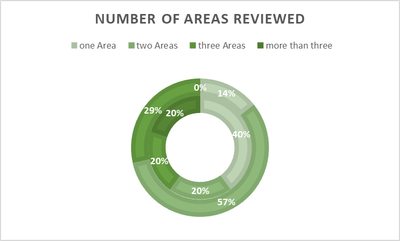
I like to create a smiple sunburts in PowerBI like it is possible in xls: 

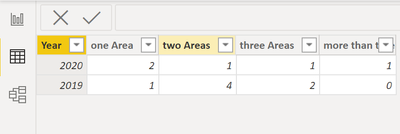
 20202019
one Area21
two Areas14
three Areas12
more than three10
total n57

acg_0-1649745605371.png

I inserted the above data in Power BI like this

acg_1-1649745776888.png

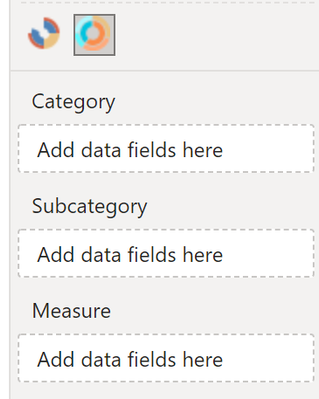
I imported the Sunburst by MAQ Software, but have problems in understanding how to create this with the above data:

Is it possible to create the same chart like with xls?

I don't understand how I need to change the data input above and what the measure is going to be?

acg_2-1649746689706.png


1 ACCEPTED SOLUTION
AllisonKennedy
Community Champion
Community Champion

@acg  You need to unpivot your raw data first. 


In Power Query (click Transform Data in the Home tab in Power BI to open Power Query), select the 'Year' column and in the Transform tab click 'Unpivot OTHER columns'


Then Close and apply changes. 


Put [Year] in Category, [Attribute] in SubCategory, and [Value] in Measure.


Please @mention me in your reply if you want a response.

Copying DAX from this post? Click here for a hack to quickly replace it with your own table names

Has this post solved your problem? Please Accept as Solution so that others can find it quickly and to let the community know your problem has been solved.
If you found this post helpful, please give Kudos C

I work as a Microsoft trainer and consultant, specialising in Power BI and Power Query.
www.excelwithallison.com

View solution in original post

4 REPLIES 4
serpiva64
Solution Sage
Solution Sage

Hi,

i don't know if it is possible

i obtained this if it is worth


serpiva64_0-1649750408487.png


AllisonKennedy
Community Champion
Community Champion

@acg  You need to unpivot your raw data first. 


In Power Query (click Transform Data in the Home tab in Power BI to open Power Query), select the 'Year' column and in the Transform tab click 'Unpivot OTHER columns'


Then Close and apply changes. 


Put [Year] in Category, [Attribute] in SubCategory, and [Value] in Measure.


Please @mention me in your reply if you want a response.

Copying DAX from this post? Click here for a hack to quickly replace it with your own table names

Has this post solved your problem? Please Accept as Solution so that others can find it quickly and to let the community know your problem has been solved.
If you found this post helpful, please give Kudos C

I work as a Microsoft trainer and consultant, specialising in Power BI and Power Query.
www.excelwithallison.com

Excellent @AllisonKennedy I will have a look how to be able to change individual colours of the different areas. But thina you so much to get me here. 

amitchandak
Super User
Super User

@acg , based on what I got.  I think you need to unpivot the table. Both Area and Year on rows. That can be used as a category and sub-category


Share with Power BI Enthusiasts: Full Power BI Video (20 Hours) YouTube
Microsoft Fabric Series 60+ Videos YouTube
Microsoft Fabric Hindi End to End YouTube

Helpful resources

Announcements
New to Fabric survey Carousel

New to Fabric Survey

If you have recently started exploring Fabric, we'd love to hear how it's going. Your feedback can help with product improvements.

Power BI DataViz World Championships carousel

Power BI DataViz World Championships - June 2026

A new Power BI DataViz World Championship is coming this June! Don't miss out on submitting your entry.

March Power BI Update Carousel

Power BI Community Update - March 2026

Check out the March 2026 Power BI update to learn about new features.