cancel
Showing results for 
Search instead for 
Did you mean: 

Learn from the best! Meet the four finalists headed to the FINALS of the Power BI Dataviz World Championships! Register now

Reply
Anonymous
Not applicable

Creating Emails

I have this statement and it works but I'm wondering if I can build on it to create a custom email when it opens the link.  I know you can do this in Excel, Word but I'm not sure if you can build out the statement to do more than just open an email.


CONCATENATE("mailto:", 'Agent Data'[EmailAddress])
1 ACCEPTED SOLUTION
Anonymous
Not applicable

Hi @Anonymous ,

I'm sorry I haven't found a better way in Power BI side so far, maybe you can try to create an email message template in your mailbox.

Best Regards

Rena

View solution in original post

5 REPLIES 5
az38
Community Champion
Community Champion

@Anonymous 

you are ccompletely correct

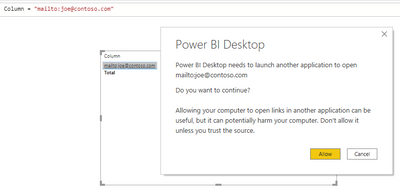
create a column witj text like mailto:joe@contoso.com

then set conditional formatting parameter Web URL to any column and it will ask you to open mail client

Снимок.PNG


do not hesitate to give a kudo to useful posts and mark solutions as solution
LinkedIn
Anonymous
Not applicable

I have pointed at the column where the emails already exist and it's working perfectly to create an email to that address.  


The question I have is, can I somehow get it to not just open the email but to open a template/form email that I can then just hit send on rather than writing the email every time.


Thank you

Anonymous
Not applicable

Hi @Anonymous ,

I‘m afraid that Power BI does not have this feature yet. What information the template/form mail include?

Best Regards

Rena

Anonymous
Not applicable

I was just looking to add on a "Thank you for your business" to the string.


I'll explore another solution unless you have another thought.


Thank you.

Anonymous
Not applicable

Hi @Anonymous ,

I'm sorry I haven't found a better way in Power BI side so far, maybe you can try to create an email message template in your mailbox.

Best Regards

Rena

Helpful resources

Announcements
Join our Fabric User Panel

Join our Fabric User Panel

Share feedback directly with Fabric product managers, participate in targeted research studies and influence the Fabric roadmap.

February Power BI Update Carousel

Power BI Monthly Update - February 2026

Check out the February 2026 Power BI update to learn about new features.

FabCon Atlanta 2026 carousel

FabCon Atlanta 2026

Join us at FabCon Atlanta, March 16-20, for the ultimate Fabric, Power BI, AI and SQL community-led event. Save $200 with code FABCOMM.

Top Kudoed Authors