Join us at FabCon Atlanta from March 16 - 20, 2026, for the ultimate Fabric, Power BI, AI and SQL community-led event. Save $200 with code FABCOMM.
Register now!The Power BI Data Visualization World Championships is back! It's time to submit your entry. Live now!
I have this statement and it works but I'm wondering if I can build on it to create a custom email when it opens the link. I know you can do this in Excel, Word but I'm not sure if you can build out the statement to do more than just open an email.
Solved! Go to Solution.
Hi @Anonymous ,
I'm sorry I haven't found a better way in Power BI side so far, maybe you can try to create an email message template in your mailbox.
Best Regards
Rena
@Anonymous
you are ccompletely correct
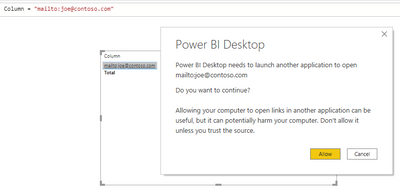
create a column witj text like mailto:joe@contoso.com
then set conditional formatting parameter Web URL to any column and it will ask you to open mail client
I have pointed at the column where the emails already exist and it's working perfectly to create an email to that address.
The question I have is, can I somehow get it to not just open the email but to open a template/form email that I can then just hit send on rather than writing the email every time.
Thank you
Hi @Anonymous ,
I‘m afraid that Power BI does not have this feature yet. What information the template/form mail include?
Best Regards
Rena
I was just looking to add on a "Thank you for your business" to the string.
I'll explore another solution unless you have another thought.
Thank you.
Hi @Anonymous ,
I'm sorry I haven't found a better way in Power BI side so far, maybe you can try to create an email message template in your mailbox.
Best Regards
Rena
The Power BI Data Visualization World Championships is back! It's time to submit your entry.
| User | Count |
|---|---|
| 49 | |
| 43 | |
| 36 | |
| 33 | |
| 30 |
| User | Count |
|---|---|
| 138 | |
| 118 | |
| 59 | |
| 59 | |
| 56 |