Get certified for free when you join Fabric Data Days 2026 and dive into Fabric, Power BI, SQL, AI, and other essential data skills.
Join nowJuly 28 - August 9 | Final Round of the Power BI Dataviz World Championships. This is your chance. Learn more
Hi, I am trying to find out a solution for showing Top Numbers as in bucket format. Ex:- I have a column (Messages). I need to find out Top 5 messages , top 5 to 10 messages , top 10 to 15 messages.I need to create it from buckets as in my drop down says as Top Messages Top 5, Top 5 to 10, Top 10 to 15. As per my drop down selections i need my table chart to display the messages accordingly. Please suggest.
Solved! Go to Solution.
Ranking =
Var YourRank = RANKX(
FILTER(Tble,
Tble[Class]=EARLIER(Tble[Class])
)
,Tble[Sl.No],,ASC
)
Return
SWITCH(
TRUE(),
YourRank<=5,"Top 5",
YourRank>5 && YourRank<=10,"Top 5-10",
YourRank>10 && YourRank<=15,"Top 10-15",
"More than 15"
)
Hi @Anonymous
Here's an idea. Create a calculated column:
Bucket =
VAR Rank_ =
RANKX ( Table1, Table1[Column to rank on],, DESC )
RETURN
SWITCH (
TRUE (),
Rank_ <= 5, "Top 5",
Rank_ <= 10, "Top 5-10",
Rank_ <= 15, "Top 10-15",
BLANK ()
)
You can then use that column to slice your data
Thank you for your response, What exactly I am looking for is :
Consider I have a table as below
| Sl.No | Class | message |
| 1 | a | abc |
| 2 | b | xyz |
| 3 | c | ww |
| 4 | b | rr |
| 5 | s | ed |
| 6 | a | sgg |
| 7 | r | thg |
| 8 | a | sc |
| 9 | b | swa |
| 10 | c | hjy |
| 11 | c | fs |
| 12 | a | sse |
| 13 | a | ew |
| 14 | c | tr |
| 15 | b | ut |
I need two drop downs 1.Class 2.TopN as (0 to5, 6to10,11 to15).
When i choose Class a in first drop down and select 0to5 bracket in second drop down, my table has to show me only top 5 recordes of Class A.
Hope i made it clear.
please suggest
Here the top 5 need to be decided by which cloumn, is there any seperate fact(like sales) for the same or top from the first column serial number?
From the above table, I need Top0to5 messages of class A.
Table should show me the messages recordes as per my selection on drop downs.
If I select Top "0t05" in 1st drop down and select "a" in class dropdown. table should give me top5 of class a records.if i select "6to10" in 1st drop down and select a or "b" in class dropdown. table should give me top 6to10 of class a or b records as per drop down selection.
what column should we consider to create buckets drop down as (0to5,6to10,11to15 & 16to20).
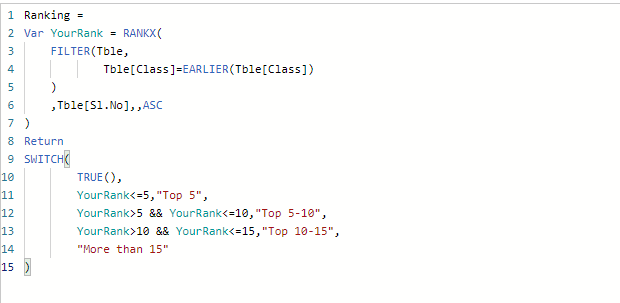
Create a new calcuated column in the table with below DAX.
Use this column as filter along with the filter for class.
Ranking =
Var YourRank = RANKX(
FILTER(Tble,
Tble[Class]=EARLIER(Tble[Class])
)
,Tble[Sl.No],,ASC
)
Return
SWITCH(
TRUE(),
YourRank<=5,"Top 5",
YourRank>5 && YourRank<=10,"Top 5-10",
YourRank>10 && YourRank<=15,"Top 10-15",
"More than 15"
)
Join us in Barcelona for FabCon and SQLCon, the Fabric, Power BI, SQL, and AI community event. Save €200 with code FABCMTY200.
If you love stickers, then you will definitely want to check out our community sticker challenge, Barcelona edition!
Check out the July 2026 Power BI update to learn about new features.
| User | Count |
|---|---|
| 26 | |
| 24 | |
| 23 | |
| 19 | |
| 17 |
| User | Count |
|---|---|
| 31 | |
| 28 | |
| 21 | |
| 19 | |
| 17 |