Join us at FabCon Atlanta from March 16 - 20, 2026, for the ultimate Fabric, Power BI, AI and SQL community-led event. Save $200 with code FABCOMM.
Register now!Vote for your favorite vizzies from the Power BI Dataviz World Championship submissions. Vote now!
Hi, I am trying to find out a solution for showing Top Numbers as in bucket format. Ex:- I have a column (Messages). I need to find out Top 5 messages , top 5 to 10 messages , top 10 to 15 messages.I need to create it from buckets as in my drop down says as Top Messages Top 5, Top 5 to 10, Top 10 to 15. As per my drop down selections i need my table chart to display the messages accordingly. Please suggest.
Solved! Go to Solution.
Ranking =
Var YourRank = RANKX(
FILTER(Tble,
Tble[Class]=EARLIER(Tble[Class])
)
,Tble[Sl.No],,ASC
)
Return
SWITCH(
TRUE(),
YourRank<=5,"Top 5",
YourRank>5 && YourRank<=10,"Top 5-10",
YourRank>10 && YourRank<=15,"Top 10-15",
"More than 15"
)
Hi @Anonymous
Here's an idea. Create a calculated column:
Bucket =
VAR Rank_ =
RANKX ( Table1, Table1[Column to rank on],, DESC )
RETURN
SWITCH (
TRUE (),
Rank_ <= 5, "Top 5",
Rank_ <= 10, "Top 5-10",
Rank_ <= 15, "Top 10-15",
BLANK ()
)
You can then use that column to slice your data
Thank you for your response, What exactly I am looking for is :
Consider I have a table as below
| Sl.No | Class | message |
| 1 | a | abc |
| 2 | b | xyz |
| 3 | c | ww |
| 4 | b | rr |
| 5 | s | ed |
| 6 | a | sgg |
| 7 | r | thg |
| 8 | a | sc |
| 9 | b | swa |
| 10 | c | hjy |
| 11 | c | fs |
| 12 | a | sse |
| 13 | a | ew |
| 14 | c | tr |
| 15 | b | ut |
I need two drop downs 1.Class 2.TopN as (0 to5, 6to10,11 to15).
When i choose Class a in first drop down and select 0to5 bracket in second drop down, my table has to show me only top 5 recordes of Class A.
Hope i made it clear.
please suggest
Here the top 5 need to be decided by which cloumn, is there any seperate fact(like sales) for the same or top from the first column serial number?
From the above table, I need Top0to5 messages of class A.
Table should show me the messages recordes as per my selection on drop downs.
If I select Top "0t05" in 1st drop down and select "a" in class dropdown. table should give me top5 of class a records.if i select "6to10" in 1st drop down and select a or "b" in class dropdown. table should give me top 6to10 of class a or b records as per drop down selection.
what column should we consider to create buckets drop down as (0to5,6to10,11to15 & 16to20).
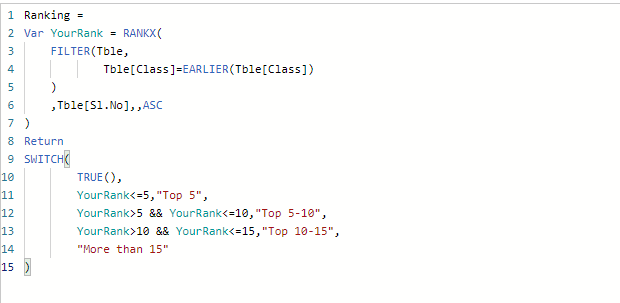
Create a new calcuated column in the table with below DAX.
Use this column as filter along with the filter for class.
Ranking =
Var YourRank = RANKX(
FILTER(Tble,
Tble[Class]=EARLIER(Tble[Class])
)
,Tble[Sl.No],,ASC
)
Return
SWITCH(
TRUE(),
YourRank<=5,"Top 5",
YourRank>5 && YourRank<=10,"Top 5-10",
YourRank>10 && YourRank<=15,"Top 10-15",
"More than 15"
)
Vote for your favorite vizzies from the Power BI World Championship submissions!
If you love stickers, then you will definitely want to check out our Community Sticker Challenge!
Check out the January 2026 Power BI update to learn about new features.
| User | Count |
|---|---|
| 64 | |
| 56 | |
| 43 | |
| 20 | |
| 17 |
| User | Count |
|---|---|
| 123 | |
| 108 | |
| 44 | |
| 32 | |
| 24 |