This is best Fabric, Power BI, SQL and AI community event. How do we know? The last event sold out! Save €200 with code FABCMTY200.
Register nowThe Fabric community is now in read-only for platform upgrade. Learn more
I'm new to creating bookmarks and I can't seem to figure out how to go about it.
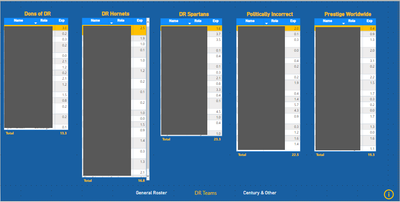
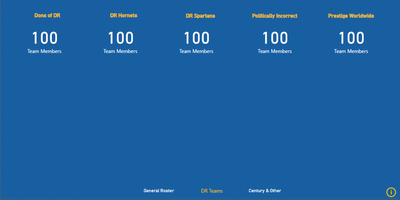
In this report, I want to display team rosters, then have the user click on the info in the bottom right, which will then blank out the tables and display the total team members on each.
Hi @Alta88 ,
I created some data:
Here are the steps you can follow:
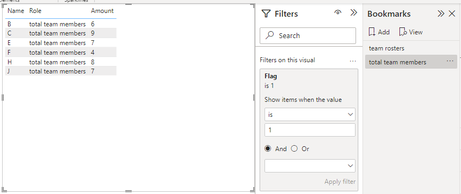
1. Create measure.
Flag =
IF(
MAX('Table'[Role])="total team members",1,0)
2. Place [Flag] in Filter, set is =1, and create a Bookmark.
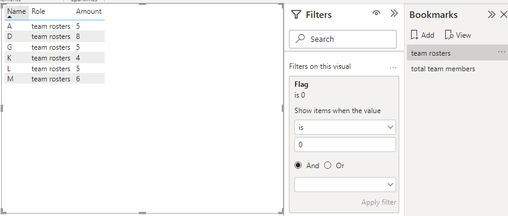
3. Place [Flag] in Filter, set is =0, and create a Bookmark.
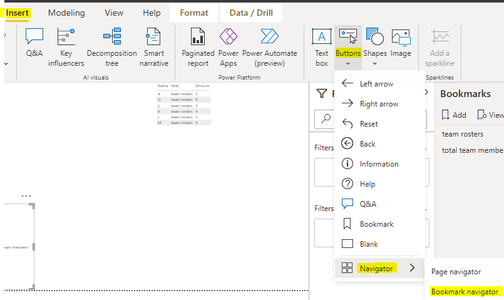
4. Insert – Button – Navigator – Bookmark bavigator.
5. Result:
If you need pbix, please click here.
Best Regards,
Liu Yang
If this post helps, then please consider Accept it as the solution to help the other members find it more quickly
I tried creating the elements to display the tables and then hide them, but then can't seem to tie in the navigation button (i) to get it toggle between views.
you cannot use buttons to toggle. You can use buttons only to enact. To toggle you need to use slicers.
Join us in Barcelona for FabCon and SQLCon, the Fabric, Power BI, SQL, and AI community event. Save €200 with code FABCMTY200.
| User | Count |
|---|---|
| 23 | |
| 22 | |
| 14 | |
| 14 | |
| 13 |
| User | Count |
|---|---|
| 47 | |
| 39 | |
| 24 | |
| 20 | |
| 20 |