Get certified for free when you join Fabric Data Days 2026 and dive into Fabric, Power BI, SQL, AI, and other essential data skills.
Join nowData Days is here! Join us now for 60+ days of learning, challenges, and connection. Learn more
Hello everyone,
I am working on a matrix which contains a measure that's a % calculation using two other measures.
% Funded = DIVIDE([Approved apps],[Total Apps])
I then created a matrix of the [% Funded] based on Purpose( in rows) and CreditLevel (in columns) resuting in below matrix format (subtotals and grand totals removed):
| Purpose | SubPrime | Prime5 | Prime6 | Superprime |
| Auto | 5% | 3.4% | 8% | 5% |
| DebtConsol | 4.6% | 4.8% | 6% | 10% |
| HomeImprovement | 8% | 3.5% | 3.8% | 4.6% |
| Others | 9.4% | 9% | 3.4% | 8% |
What I am looking for is that the above %s to change such that I have the row total percentage and column total percentage to be 100% each from the above %values.
I do know if the cell values were numbers ( eg: [Total apps]), I could have used a DAX formula given below for column totals to end up 100%, but its not working for a measure that's a percentage itself:
1 2 3 4 5 6 | % of CreditTier on Rows = DIVIDE ( [Total Apps], CALCULATE ( [Total Apps], ALLSELECTED( 'Table'[Purpose] ) ) ) |
Please do let me know if I need to add any more info to resolve this.
Thanks in advance.
Solved! Go to Solution.
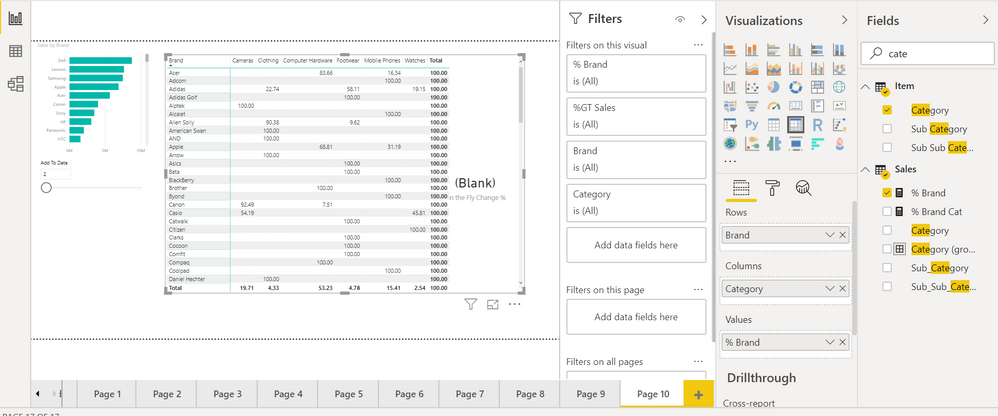
Check
% Brand =
CALCULATE ( SUM ( Sales[Sales] ) )
/ CALCULATE (
SUM ( Sales[Sales] ),
ALLEXCEPT ( 'Item','Item'[Brand])
)*100I have a report listing invoices with multiple sales. The invoice is listed 3 times and the tax lines are the same so I have a column:
@Anonymous ,
The info you gived is not complete, could you please also share measures [Approved apps], [Total Apps]. If possible, please also give the expected output.
Regards,
Jimmy Tao
[Approved] := calculate(distinctcount(AppdId),FILTER(distinct(Data[SubmittedDate]),
[SubmittedDate] >= MIN(dCalender[DimDateKey]) && [SubmittedDate] <= MAX(dCalender[DimDateKey]) && [IsApproved] =1))
[Total Apps] := calculate(distinctcount(AppdId),FILTER(distinct(Data[SubmittedDate]),
[SubmittedDate] >= MIN(dCalender[DimDateKey]) && [SubmittedDate] <= MAX(dCalender[DimDateKey])))
Expected output matrix:
| Purpose | SubPrime | Prime5 | Prime6 | Superprime | Expected Total |
| Auto | 20% | 40% | 32% | 8% | 100% |
| DebtConsol | 15% | 35% | 20% | 30% | 100% |
| HomeImprovement | 10% | 30% | 40% | 20% | 100% |
| Others | 40% | 25% | 30% | 5% | 100% |
So, if the total count of Funded (since the intial % was for funded) is 100; suppose, 25 of them are Auto ( as purpose), then this 25 is spilt into the four credit levels ( eg: #Subprime - 5, #Prime5 - 10, #Prime6 - 8 and #Superprime: 2, which totals 25). So, the row totals have to end up to 100% ( i.e. Subprime: 5/25 = 20%, Prime5: 10/25 = 40%, Prime6: 8/25 =32%, Superprime: 2/25 =8%).
I hope I was able to explain it. Similarly, I want to do the same at the column level as well.
Don't miss out on Data Days, June 15 through August 7. Learn Fabric, Power BI, SQL, AI and more.
Check out the May 2026 Power BI update to learn about new features.
| User | Count |
|---|---|
| 23 | |
| 21 | |
| 20 | |
| 19 | |
| 13 |
| User | Count |
|---|---|
| 58 | |
| 52 | |
| 37 | |
| 31 | |
| 27 |