cancel
Showing results for 
Search instead for 
Did you mean: 

July 7 - July 17 | Round 2 of the Power BI Dataviz World Championships. Don't miss your chance! Learn more

Reply
OscarSuarez10
Helper III
Helper III

Refresh Problem

Hello Im trying to refresh my data but I´m having the following problem:

refreshproblem.JPG

But the data is correctly refreshed in the Query Editor and when I click close and apply to go back to the report the previous message appears, why refreshing works in the Query Edit but don´t in the report?. Please Help.

1 ACCEPTED SOLUTION

The problem was that it was creating some relationships with other tables automatically and that amde some conlficts, but when I delete the relationships I could refresh the data correctly

View solution in original post

4 REPLIES 4
Anonymous
Not applicable

Hi,

scroll down and see which table is causing the problem, go to that table and try to find which step is causing error. If you scroll down you should see which step is it and then have a closer look on query editor.


daniel

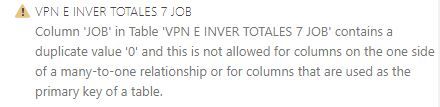
Hello I scrolled down and found this message but i don´t know what does it mean?


refreshproblem2.JPG


Anonymous
Not applicable

It basically means on table VPN E INVER TOTALES 7 JOB in column JOB you have more than one 0 which is not allowed.


You need to go to that table/ column and change it so column JOB doesn't contain any duplicates.

The problem was that it was creating some relationships with other tables automatically and that amde some conlficts, but when I delete the relationships I could refresh the data correctly

Helpful resources

Announcements
Fabric Data Days is here Carousel

Data Days 2026

Don't miss out on Data Days, June 15 through August 7. Learn Fabric, Power BI, SQL, AI and more.

Power BI DataViz World Championships carousel

Power BI DataViz World Championships - June 2026

A new Power BI DataViz World Championship is coming this June! Don't miss out on submitting your entry.