This time we’re going bigger than ever. Fabric, Power BI, SQL, AI and more. We're covering it all. You won't want to miss it.
Learn moreLevel up your Power BI skills this month - build one visual each week and tell better stories with data! Get started
Hello Im trying to refresh my data but I´m having the following problem:
But the data is correctly refreshed in the Query Editor and when I click close and apply to go back to the report the previous message appears, why refreshing works in the Query Edit but don´t in the report?. Please Help.
Solved! Go to Solution.
The problem was that it was creating some relationships with other tables automatically and that amde some conlficts, but when I delete the relationships I could refresh the data correctly
Hi,
scroll down and see which table is causing the problem, go to that table and try to find which step is causing error. If you scroll down you should see which step is it and then have a closer look on query editor.
daniel
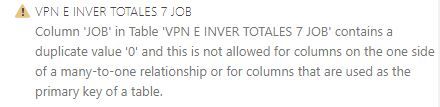
Hello I scrolled down and found this message but i don´t know what does it mean?
It basically means on table VPN E INVER TOTALES 7 JOB in column JOB you have more than one 0 which is not allowed.
You need to go to that table/ column and change it so column JOB doesn't contain any duplicates.
The problem was that it was creating some relationships with other tables automatically and that amde some conlficts, but when I delete the relationships I could refresh the data correctly
Check out the April 2026 Power BI update to learn about new features.
Sign up to receive a private message when registration opens and key events begin.
If you have recently started exploring Fabric, we'd love to hear how it's going. Your feedback can help with product improvements.
| User | Count |
|---|---|
| 36 | |
| 33 | |
| 31 | |
| 24 | |
| 18 |
| User | Count |
|---|---|
| 68 | |
| 50 | |
| 33 | |
| 24 | |
| 24 |